Prozesssimulation

Prozesssimulation
Die Prozesssimulation wendet ein Fertigungsprozessmodell während der Simulation an, um die Auswirkungen dieser Fertigungsaktivität zu berechnen und zu visualisieren. Zum Beispiel die Beschichtungsdicke eines Lackierprozesses.
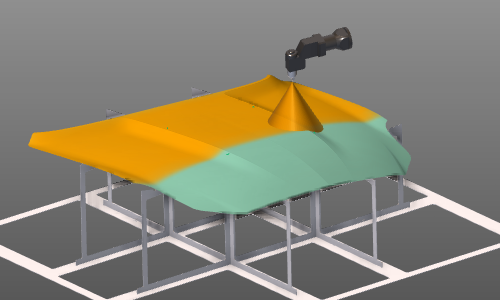
Um eine Prozesssimulation korrekt und zuverlässig durchzuführen, müssen einige Schritte unternommen und Randbedingungen festgelegt werden.
Prozesssimulationsobjekt
Das Prozesssimulationsobjekt (PSO) ist die Komponente oder ein Teil einer Komponente, auf die der Prozess einwirkt. Mit anderen Worten: Das PSO ist das Objekt, auf dem das Ergebnis eines Fertigungsprozesses berechnet und analysiert werden kann. In vielen Fällen ist dies (ein Teil) des Werkstücks, aber auch andere Ressourcen können durch einen Prozess beeinflusst werden.
Das PSO ist ein geometrisches Element, das von der zugehörigen Eingabegeometrie abgeleitet wird. Ein vordefiniertes Datenmodell bestimmt, wie dieses PSO erzeugt wird. Dies kann je nach Technologie und den zu analysierenden Prozesswerten unterschiedlich sein. Auf das Datenmodell und seine Attribute kann im PSO-Dashboard zugegriffen werden.
Auf diesem Datenmodell wird die Auswirkung des Prozesses während der Simulation berechnet. Das PSO wird verwendet, um die Ergebnisse der Simulation zu visualisieren und zusammen mit dem Werkstück zu speichern.
Prozessmodell
Das Prozessmodell ist das mathematische Modell, das die Werte der physikalischen Fertigungsparameter berechnet, um diese Parameter zu simulieren. Mehrere Prozessmodelle können existieren und gleichzeitig arbeiten. Jedes von ihnen arbeitet unabhängig voneinander.
Obwohl mehrere Prozessmodelle existieren können, kann deren Einfluss nur auf dem PSO berechnet werden, wenn ein Datenmodell vorliegt, das mit den Eingabedaten des Prozessmodells übereinstimmt.
Das Prozessmodell ist in zwei Teile unterteilt.
Werkzeugprozessmodell
Dieser Teil des Prozessmodells berechnet während der Simulation kontinuierlich den Status und die Ausgabe am Werkzeug. Die Informationen zur Berechnung dieses Status stammen vom Werkzeug selbst (Position, Aktivierung usw.) und vom Prozesssteuergerät (zum Beispiel Sprühdurchflussrate). Mit diesen Informationen werden die Einflussdaten auf das PSO erstellt.
Das Werkzeugprozessmodell wird auf der Werkzeugressource aktiviert.
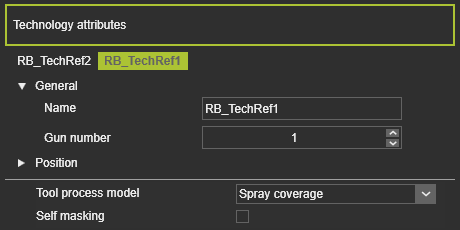
Der Ursprung, von dem aus die Berechnung im 3D-Raum durchgeführt wird, wird als technologischer Bezugsrahmen definiert. Dieser Rahmen erhält eine Pistolen-Nummer. Ein Werkzeug kann mehrere Pistolen haben, von denen jede während der Offline-Programmierung einzeln aktiviert werden kann.
Wenn die (Werkzeug-)Ressource für eine Technologie eingerichtet wurde, die ein oder mehrere Prozessmodelle umfasst, werden diese Modelle im Resource properties Dashboard verfügbar. Das Modell, das simuliert werden soll, muss hier eingestellt werden.
Um den Status und die Ausgabe des Werkzeugs während der Simulation zu berechnen, werden Hintergrundinformationen benötigt.
Einerseits handelt es sich bei diesen benötigten Informationen um das Prozessverhalten der Vorrichtung. Dies ist ein Datensatz von Informationen, der das Ergebnis der Vorrichtung unter bestimmten definierten Bedingungen beschreibt. Zum Beispiel basierend auf gesammelten experimentellen Daten.
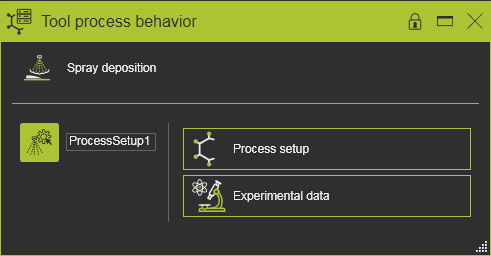
Und auf der anderen Seite sind diese Informationen der aktuelle Zustand, in dem die Vorrichtung während der Simulation arbeitet. Dies kann beispielsweise die Information darüber sein, an welchen Positionen die Vorrichtung während der Simulation arbeitet. Die Informationen stammen vom Steuergerät. Neben den Signalen, wann die Vorrichtung aktiviert wird, verwendet das Steuergerät Prozesstabellen, die die Betriebsbedingungen der Vorrichtung definieren, d. h. den Ausgabestatus der Vorrichtung.
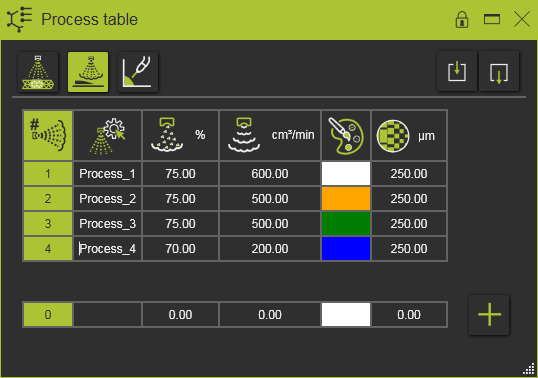
Der tatsächliche Ausgang des Werkzeugs wird dann aus den oben genannten Informationen berechnet und interpoliert.
Objekt-Prozessmodell
Dieser Teil des Prozessmodells berechnet die Auswirkung, die vom Werkzeug-Prozessmodell auf die definierten physikalischen Parameter des PSO ausgeht.
Es ist durchaus möglich, dass verschiedene Prozessmodelle denselben physischen Parameter auf dem PSO verwenden.
Simulation
Die Prozesssimulation muss in der Simulations-Player-Leiste aktiviert werden.

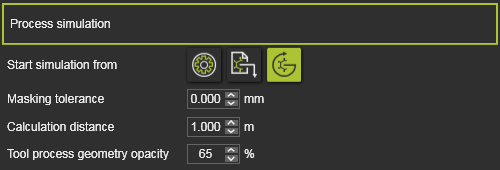
In den Simulationseinstellungen werden die Randbedingungen für die Prozesssimulation festgelegt.
Bildgebung
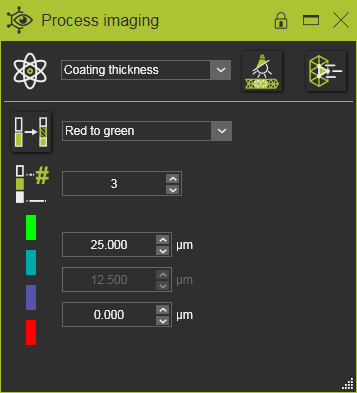
Das Simulationsergebnis wird direkt auf dem PSO visualisiert. Das Process Imaging Dashboard bietet mehrere Nachbearbeitungswerkzeuge, um das Simulationsergebnis bevorzugt darzustellen und somit eine Analyse zu ermöglichen.
Das tatsächliche Ergebnis und damit dessen Genauigkeit einer angezeigten Prozesssimulation hängt von der Kombination der Werkzeugbewegung, der Größe der Elemente des Prozessgeometrieobjekts und der Simulationsschrittgeschwindigkeit ab. Vor diesem Hintergrund kann die Simulation lokal kleinere Abweichungen sowie grafische Ausgaben zeigen, die als Moiré-Effekte bekannt sind.