Standard-Hilfsbefehle
Übersicht
Neben den technologie- und OEM-spezifischen Python-Skripten, die als Hilfsbefehle ausgeführt werden, enthält die Software einige Standardlösungen. Diese Skripte befinden sich im Plugin-Ordner des Installationspfads.
Grundlegender Werkzeugwegbericht
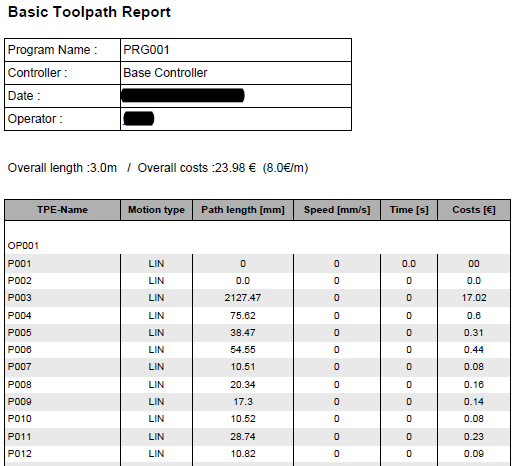
Der Befehl Basic toolpath report erzeugt einen standardmäßigen PDF-Bericht des programmierten Werkzeugwegs.
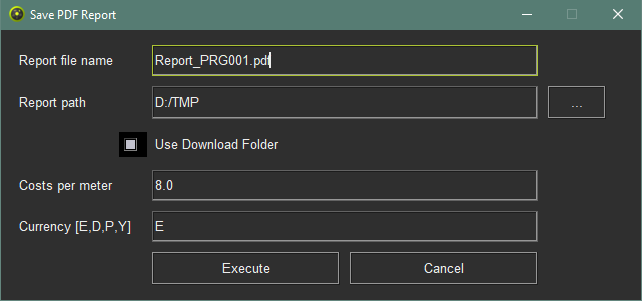
Wenn der Befehl gestartet wurde, erscheint ein Fenster:
| Attribut | Beschreibung | Bemerkung |
|---|---|---|
| Berichtsdateiname | Der Name der PDF-Datei. | |
| Berichtspfad | Der Pfad auf der Festplatte, an dem die PDF-Datei gespeichert wird. | |
| Download-Ordner verwenden | Wechseln Sie automatisch zum gleichen Pfad wie der Speicherort der heruntergeladenen Dateien. | |
| Kosten pro Meter | Der Kostenwert des Werkzeugwegs pro Meter als Referenz zur Berechnung der Herstellungskosten. | |
| Währung (E, D, P, Y) | Die Währung, in der die Kosten berechnet werden. | E = Euro D = US-Dollar P = Chinesisches Pinyin Y = Japanischer Yen |
| Schaltfläche | ||
| Ausführen | Ausführen, um den Bericht zu erstellen | |
| Abbrechen | Abbrechen, um den Befehl ohne Berichtserstellung zu unterbrechen und zu beenden. |
Der Standardbericht sieht dann wie im folgenden Beispiel aus:
Technologiespezifische Hilfsbefehle

Was this page helpful?