Kartesische Interpolation

Mit dem Cartesian interpolation Befehl kann eine lineare Interpolation der Normalenrichtung, der Tangentenrichtung oder der Versatzposition zwischen den Bahnen eines Oberflächen-Werkzeugwegs angewendet werden.
An der ausgewählten Werkzeugbahnspur erscheinen die Markierungen der Algorithmen.
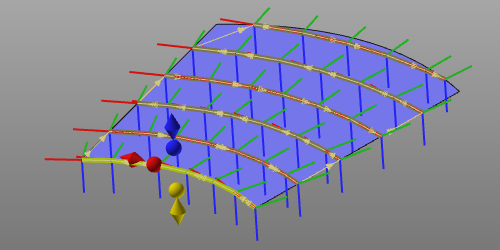
| Interpolation | Modus | Marker |
|---|---|---|
| Kartesisch normal | Absolut | Blaues Rhombus |
| Relativ | Blaue Kugel | |
| Kartesischer Tangent | Absolut | Rotes Rhombus |
| Relativ | Rote Kugel | |
| Kartesischer Versatz | Absolut | Gelbes Rhombus |
| Relativ | Gelbe Kugel |
Der erforderliche Marker muss ausgewählt werden. Um die Auswahl abzuschließen und die Optimierung (d. h. Interpolation) zu berechnen, muss das Intervall, in dem optimiert werden soll, durch Auswahl einer zweiten Werkzeugbahn geschlossen werden. Die Berechnung wird automatisch ausgeführt und das Ergebnis angezeigt.
Weitere Referenzinformationen

Was this page helpful?