Bearbeiten Sie die äußere Begrenzungskontur

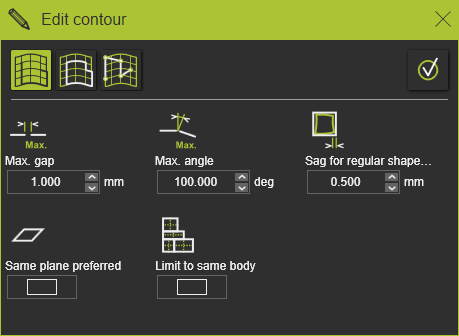
Der Befehl Edit the boundary curve öffnet das Fenster Edit contour, um die äußere Begrenzung der Fertigungsgeometrie zu ändern oder neu zu erstellen.
Wenn das Bedienfeld nicht angezeigt wird oder geschlossen wurde, öffnen Sie das Kreis-Menü im 3D-Raum und drücken Sie die Befehlsschaltfläche

Es gibt drei Möglichkeiten, den Konturverlauf der Führungskurve zu definieren oder zu bearbeiten.
 | Search until Erstellt die Kontur, während entlang der Kanten einer Oberfläche oder anderer geometrischer Kurvenelemente gesucht wird. |
 | Search to close Versucht, automatisch einen geschlossenen Konturverlauf beginnend am ausgewählten Flächenrand oder einem anderen geometrischen Kurvene-lement zu erstellen. |
 | Freie Suche Erstellt eine Kontur zwischen interaktiv definierten Kontrollpunkten, die auf einer Fläche, einer Flächenkante oder einem anderen geometrischen Kurvene-lement definiert sind. |
Jede dieser Methoden zur Konturdefinition verfügt über eigene Parameter und zusätzliche Pie-Befehle, die die Suche nach der gewünschten Kontur unterstützen. Detaillierte Informationen finden Sie in den unten aufgeführten Referenzseiten.
Wenn die äußere Begrenzung neu aufgebaut wurde, wird der Werkzeugweg automatisch neu berechnet.
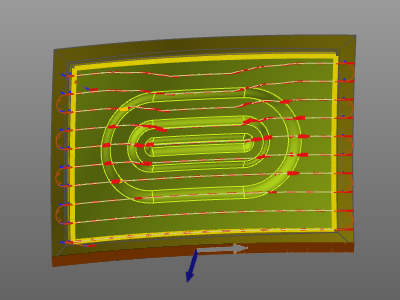 | 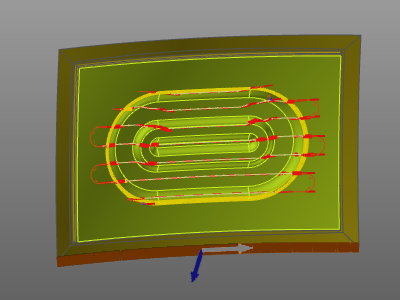 |
Beachten Sie, dass der äußere Begrenzungskontur stets geschlossen sein muss, bevor er in der Lage ist, den Werkzeugweg zu (re-)berechnen. Den Werkzeugweg (neu) berechnen.
