Oberflächensuche – Referenzinformationen
Oberflächensucheinstellungen
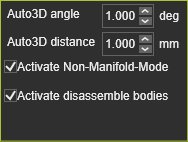
Bei der Auswahl von Oberflächengeometrien sucht das System nach inneren und äußeren Begrenzungskonturen auf Oberflächenelementen. Es können mehrere Oberflächen ausgewählt werden. In diesem Fall versucht die Suchmaschine, benachbarte Oberflächen zu einem einzigen Bereich zusammenzuführen, für den die Begrenzungen gesucht werden. Es können jedoch mehrere Bereiche existieren. In diesem Fall werden für jeden Bereich die Begrenzungen erzeugt.
| Automatischer 3D-Winkel | Adjacent surfaces are merged when the angle between the (in surface) normals at the edges is smaller than the defined angle value. 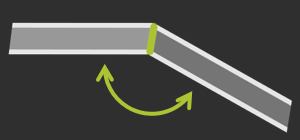 |
| Automatischer 3D-Abstand | Adjacent surfaces are merged when the gap between the edges is smaller than the defined distance value.  |
| Nicht-Mehrfachkanten-Modus aktivieren | When multiple possible solutions exist to merge adjacent surfaces, activating the option results in the solution where the angle between the adjacent surfaces is the smallest.  |
| Aktivieren Sie das Zerlegen von Körpern | Bodies can be disassembled in single surfaces, to generate other domains. 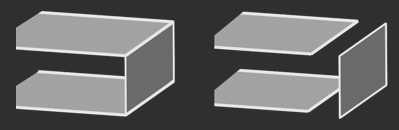 |
Was this page helpful?