Öffnen

Mit dem Befehl Open kann ein neues, bestehendes Dokument geladen werden.
Der Befehl öffnet einen Browser mit zwei Spalten.
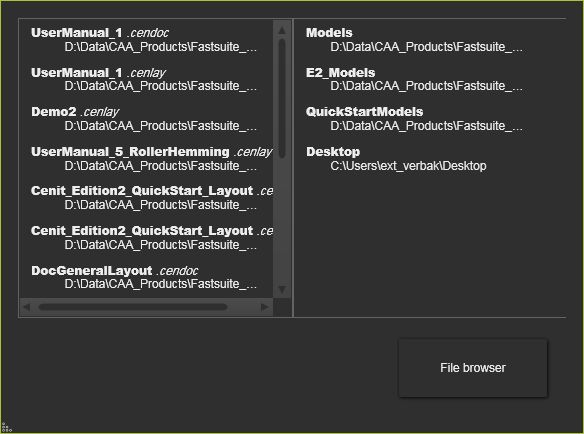
Die linke Spalte zeigt eine Liste der zuletzt geöffneten Dokumente. Aus dieser Liste wird das ausgewählte Dokument direkt geöffnet. Die rechte Spalte zeigt eine Liste der zuletzt verwendeten Ordner, aus denen Dokumente geladen wurden. Die Auswahl eines Ordners aus dieser Liste öffnet einen Standard-Dateibrowser an diesem Ordnerstandort, um ein beliebiges verfügbares Dokument aus diesem Ordner zu öffnen. Das Durchsuchen anderer Ordner bleibt jedoch selbstverständlich weiterhin möglich.
Die  -Taste öffnet ebenfalls einen Standard-Dateibrowser, jedoch am Stammverzeichnis des Laufwerks C. Von dort aus kann jeder zugängliche Ordner geöffnet werden, um ein Dokument zu öffnen.
Wenn das Öffnen des Dokuments nicht erfolgreich ist, erscheint eine Fehlermeldung. Falls die Software die zugrunde liegenden Datei(en) des Dokuments nicht finden kann, öffnet sich die File Manager, damit der Benutzer entscheiden kann, wie er fortfahren möchte.
Der Befehl Öffnen kann auch mit der Tastenkombination Ctrl + O gestartet werden.
Der Befehl Öffnen ermöglicht nicht nur das Laden von Dokumenten des Typs FASTSUITE Edition 2, sondern auch jegliche (CAD) Dokumenttyp, der von der Software unterstützt wird.
Neben dem Befehl Öffnen zum Laden eines Dokuments unterstützt die Software auch die Drag-and-Drop-Methode. um das Dokument direkt zu laden, während es aus einem Dateibrowser oder vom Desktop in die 3D-Ansicht gezogen wird. Der Effekt dieser Methode ist jedoch leicht unterschiedlich.
