Dateimanager

Das Ausführen des File manager in einer laufenden Sitzung öffnet ein a-Fenster, das alle Dokumente der Sitzung und deren Beziehung in einer Baumstruktur anzeigt.
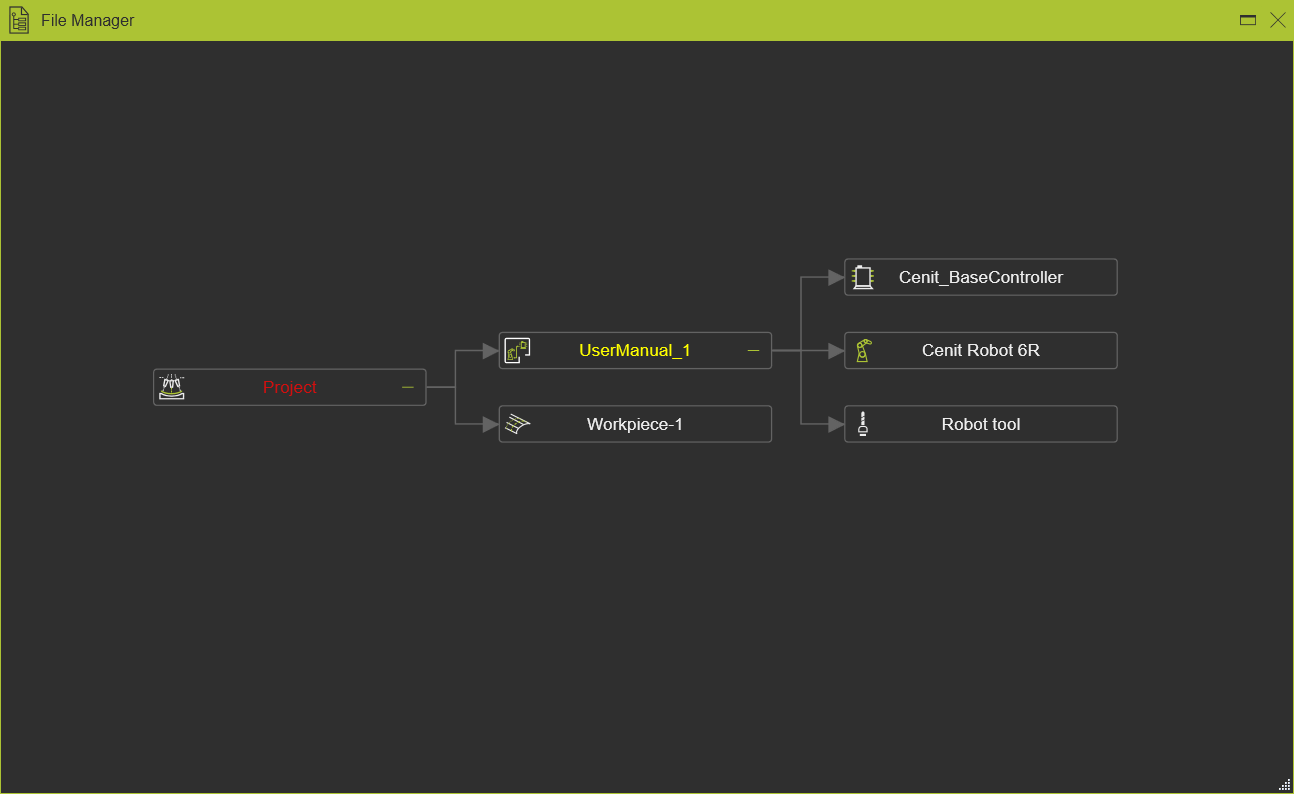
Das Schweben über oder Auswählen eines Elements im Fenster hebt das entsprechende Element in der 3D-Ansicht hervor und wählt es aus, und umgekehrt.
Mit der Maus kann der Baumgraph zur besseren Sichtbarkeit manipuliert werden. Das Gedrückthalten der left mouse button ermöglicht das Verschieben des Baums. Das Drücken der Ctrl-key in Kombination mit dem scroll wheel der Maus zoomt den Baum hinein oder heraus.
Bei jedem Element im Diagramm kann das Pie-Menü geöffnet werden.



Im leeren Bereich des Fensters kann ebenfalls ein Kreis-Menü geöffnet werden.


Weitere Layout- und Dokumentenreferenzinformationen

Was this page helpful?