Referenzseite Materialfluss

Materialfluss
Materialfluss ist das Erscheinen, die Bewegung und das Entfernen von Materialien, wie Werkstücken, während der Simulation innerhalb von FASTSUITE Edition 2.
Materialien erscheinen an einer Materialquelle in einem festgelegten Zeitintervall oder werden durch ein Port-Signal ausgelöst. Wenn sich das Material bewegt und an einem bestimmten Punkt mit einer Materialsenke kollidiert, wird es aus der Simulation entfernt. Dieses Verhalten kann im Material simulation Dashboard im Resource Builder-Arbeitsbereich definiert werden.
Der Materialfluss und damit die Materialien existieren nur während des Lebenszyklus der Simulation.
Senke
Eine Quelle ist die Auslöseposition, an der das Material während der Simulation erscheint. Die Quelle ist ein Bezugssystem mit einer zusätzlichen 3D-Darstellung.
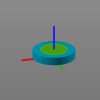
Die Quelle wird im Zentrum des Manipulators mit der Position und Ausrichtung des Manipulators erstellt.
Im Actuators Dashboard können die Quellattribute geändert werden.
| Attribut | Beschreibung | Bemerkung |
|---|---|---|
 | ||
| Name | Der Name der Materialquelle. | Ein leerer Name ist zulässig. |
 | ||
| X, Y, Z | Die X-, Y- und Z-Koordinaten der Quelle. | Die Koordinaten sind auf das globale Koordinatensystem der Komponente eingestellt. |
| Roll(X), Nick(Y), Gier(Z) | Die Roll-, Nick- und Gierausrichtung der Quelle. | Die Orientierungwinkel sind auf das globale Koordinatensystem der Komponente eingestellt. |
Sein Simulationsverhalten wird im Material simulation Dashboard definiert.
| Attribut | Beschreibung | Bemerkung |
|---|---|---|
| ||
| Auslöser | Der Auslöser für das Erscheinen des Materials. Der Auslöser kann sein: Zeit Ports-Signal | The material appears on the rising edge of the port signal. 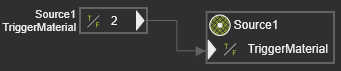 |
| Auslösezeit | Die Auslösezeit während der Simulation, zu der das Material erscheint. | Nur gültig, wenn der Zeittrigger gesetzt wurde. |
| Sequenz | Die Reihenfolge, in der das Material erscheint. | Fest. |
 | ||
| Der Materialselektor zur Zuweisung eines Werkstücks aus dem Layout zur Quelle. |
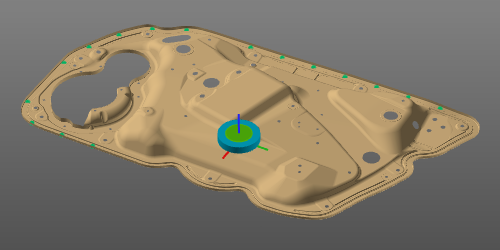
Während der Simulation erscheint am Quellort eine „leichte“ Kopie des zugewiesenen Materials. Um das Material korrekt zu positionieren, wird der Wurzelrahmen des übergeordneten Materials mit dem Rahmen der Quelle platziert und ausgerichtet.
Senke
Ein Sink ist der Auslöser, um das Material aus der Simulation zu entfernen. Der Sink ist ein Rahmen, der eine zusätzliche 3D-Darstellung zeigt, kombiniert mit einer Sink-Box.
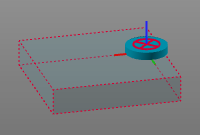
Die Sink-Box ist der empfindliche Bereich, in dem das Material verschwindet. Wenn während der Simulation der Wurzelrahmen eines Materials diesen Sink-Box-Bereich betritt, wird das Material sofort aus der Simulation entfernt und verschwindet.
Die Senke wird im Zentrum des Manipulators mit der Position und Ausrichtung des Manipulators erstellt.
Im Actuators Dashboard können die Sink-Attribute geändert werden.
| Attribut | Beschreibung | Bemerkung |
|---|---|---|
| ||
| Name | Der Name der Materialsenke. | Ein leerer Name ist zulässig. |
| Breite (X), Tiefe (Y), Höhe (Z) | Die Größe der Aktivierungsbox der Senke. | Die Abmessungen der Box werden vom Ursprung der Senke aus definiert. |
| ||
| X, Y, Z | Die X-, Y- und Z-Koordinaten des Sinks. | Die Koordinaten sind auf das globale Koordinatensystem der Komponente eingestellt. |
| Roll(X), Nick(Y), Gier(Z) | Die Roll-, Nick- und Gierausrichtung der Senke. | Die Orientierungwinkel sind auf das globale Koordinatensystem der Komponente eingestellt. |


