Arbeitszellenkonfiguration

Armaturenbrett
Im Workcell Configuration Dashboard werden die Eigenschaften des Controllers, der in der Arbeitszelle arbeitet, eingestellt. Dies ist wichtig für den späteren Download der Fertigungsprogramme.
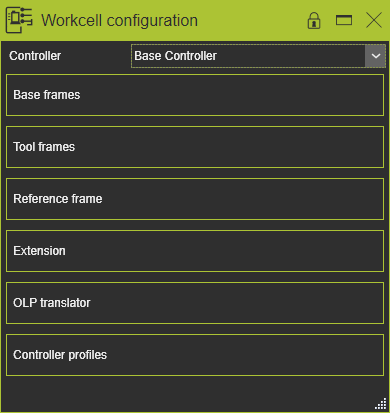
Für jeden Controller in der Arbeitszelle sind diese Schritte durchzuführen. Der Controller, für den die Informationen festgelegt oder geändert werden sollen, kann aus der Liste der Controller ausgewählt werden.

Basiskörper / Werkzeugkörper
Die Container für Basisrahmen und Werkzeugrahmen funktionieren identisch. Der Container zeigt alle Rahmen dieses Typs an, die innerhalb der Arbeitszelle vorhanden sind. Die Auswahl eines Rahmens im Dashboard hebt diesen im 3D-Ansichtsfenster hervor.
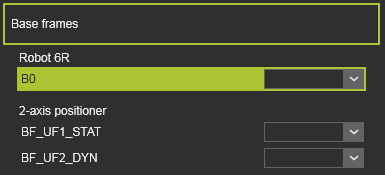
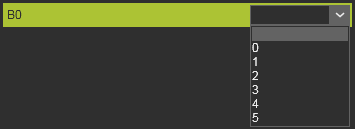
Für jeden der Rahmen kann die Dropdown-Liste geöffnet werden, um die Nummer festzulegen. Die Nummer entspricht dem Attribut „Maximale Rahmenprofile“, das für den Controller angegeben wurde. Es sollte offensichtlich sein, dass eine Nummer nur einmal einem Rahmen zugewiesen werden kann. Wenn sie bereits einem anderen Rahmen zugewiesen wurde, wird dieser bestimmte Rahmen zurückgesetzt.
Bezugsrahmen
Dieser Container enthält die Informationen der Arbeitszelle, in der der Controller betrieben wird.
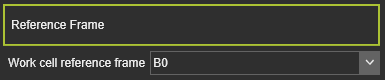
| Attribut | Beschreibung | Bemerkung |
|---|---|---|
| Arbeitszellen-Referenzrahmen | Ein Controller muss seinen Zellen-Referenzrahmen kennen. Wählen Sie den Referenzrahmen der Arbeitszelle aus der Dropdown-Liste der verfügbaren Rahmen aus. | Alle Basisrahmen werden anschließend in Bezug auf den definierten Bezug in die XML-Ausgabe exportiert. |
Erweiterung
In diesem Container kann die Konfiguration der Controller-Erweiterung definiert werden.
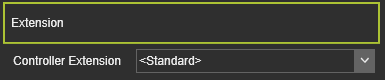
Die Konfigurations-XML-Datei befindet sich im Installationsordner ../Plugin/ControllerSettings. Die Datei enthält Informationen über die angewandte Technologie, die Attribute, Ereignisse und deren Standardwerte.
OLP-Übersetzer
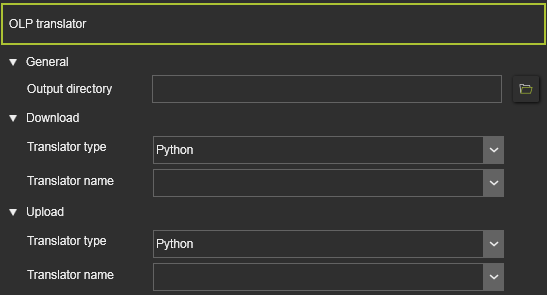
Um das simulierte Programm auf den physischen Roboter oder die Fertigungsmaschine exportieren zu können, muss das Programm in der korrekten, entsprechenden Sprache geschrieben sein.
| Attribut | Beschreibung |
|---|---|
| Allgemein | |
| Ausgabeverzeichnis | Der Pfad und Dateiname, unter dem die Programmausgabedatei gespeichert werden soll. |
| Herunterladen / Hochladen | |
| Übersetzertyp | The data format of the translator, to filter the list of available translators. It can be selected between: 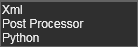 |
| Name des Übersetzers | Aus der Dropdown-Liste muss die erforderliche Downloader- oder Uploader-Datei mit den Übersetzerdefinitionen und -befehlen ausgewählt werden. Ein Übersetzer ist herstellerspezifisch. Je nach Steuerungshersteller sucht das System in den Plugin-Ordner(n) nach den verfügbaren Übersetzern dieses Herstellers. |
Controller-Profile
Dieser Container enthält Tabellen für Programmierattribute des Controllers.
Der Inhalt ist controllerspezifisch (Marke). Er kann über (Python-)Anpassungen in den Controller-Paket-Plugins definiert werden. Das untenstehende Bild zeigt ein Beispiel.
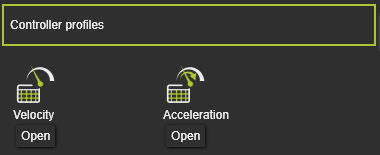
Durch Drücken der Open-Taste wird die Tabelle in einem separaten Bereich geladen. Hier kann die Tabelle bearbeitet werden.
Hier kann auch ein Kreis-Menü aufgerufen werden, um die Tabellen aus einer externen Datei zu importieren, wodurch der aktuelle Tabelleninhalt überschrieben wird, oder um die Tabelle in eine externe Datei zu exportieren.
