Ressourcen-Sensoren

Sensoren
Sensoren sind Komponenten, meist elektrische Bauteile, die Prozessgrößen erfassen oder messen können. Das Ausgangssignal eines Sensors ist ein Signal.
Die Software unterstützt die folgenden Sensortypen.

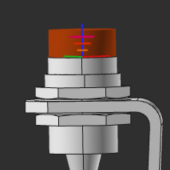
Ein Näherungssensor kann die Anwesenheit eines Objekts erkennen, ohne physischen Kontakt mit diesem Objekt herzustellen.
Im 3D-Ansichtsfenster wird der Näherungssensor grafisch durch ein Objekt dargestellt, wie im folgenden Bild gezeigt.

Der Zylinder des Sensorobjekts zeigt die tatsächlichen Abmessungen des Erfassungsbereichs bzw. Kollisionsbereichs des Sensors an.
Ein Näherungssensor verfügt über die folgenden Attribute:
| Attribut | Beschreibung | Bemerkung |
|---|---|---|
 | ||
| Name | Der Name des Näherungssensors. | Ein leerer Name ist zulässig. |
| Porttyp | Der Porttyp des Sensors, d. h. das Schaltverhalten bei Erkennung. | The sensor supports two types:  normally open NO normally closed NC normally open NO normally closed NC |
| Schaltdurchmesser | Der Durchmesser des Sensorerfassungsbereichs. | |
| Schaltabstand | Die Höhe des Erfassungsbereichs des Sensors. | |
 | ||
| X, Y, Z | Die X-, Y- und Z-Koordinaten des Sensors. | Die Koordinaten sind auf das globale Koordinatensystem der Komponente eingestellt. |
| Roll (X), Nick (Y), Gier (Z) | Die Roll-, Nick- und Gierausrichtung des Sensors. | Die Orientierungwinkel sind auf das globale Koordinatensystem der Komponente eingestellt. |
 | Definiert, welche Klassen von Bauteilen der Sensor erkennen kann. Auswahl erfolgt über das entsprechende Klassen-Symbol. | Der Befehl „Zurücksetzen“ stellt die Definition auf die Basiseinrichtung zurück. |
The class workpieces.  | ||
The resource classes. 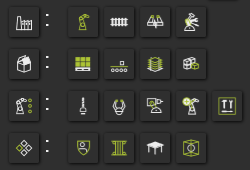 | Das Auswählen des Kategorie-Symbols setzt alle Komponenten der Kategorie. | |
The class humans.  |

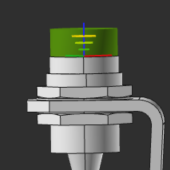
Ein Lichtschranken-Sensor kann die Anwesenheit eines Objekts ohne physischen Kontakt mit diesem Objekt erfassen.
Im 3D-Ansichtsfenster wird der Lichtschranken-Sensor grafisch durch ein Objekt dargestellt, wie im folgenden Bild gezeigt.
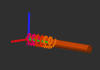
Der Zylinder des Sensorobjekts zeigt die tatsächlichen Abmessungen des Erfassungsbereichs bzw. Kollisionsbereichs des Sensors an.
Ein Lichtschranken-Sensor verfügt über die folgenden Attribute:
| Attribut | Beschreibung | Bemerkung |
|---|---|---|
| ||
| Name | Der Name des Näherungssensors. | Ein leerer Name ist zulässig. |
| Porttyp | Der Porttyp des Sensors, d. h. das Schaltverhalten bei Erkennung. | The sensor supports two types: normally open NO normally closed NC |
| Schaltdurchmesser | Der Durchmesser des Sensorerfassungsbereichs. | |
| Schaltabstand | Die Höhe des Erfassungsbereichs des Sensors. | |
| ||
| X, Y, Z | Die X-, Y- und Z-Koordinaten des Sensors. | Die Koordinaten sind auf das globale Koordinatensystem der Komponente eingestellt. |
| Roll (X), Nick (Y), Gier (Z) | Die Roll-, Nick- und Gierausrichtung des Sensors. | Die Orientierungwinkel sind auf das globale Koordinatensystem der Komponente eingestellt. |
| Definiert, welche Klassen von Bauteilen der Sensor erkennen kann. Auswahl erfolgt über das entsprechende Klassen-Symbol. | Der Befehl „Zurücksetzen“ stellt die Definition auf die Basiseinrichtung zurück. |
| The class workpieces. | ||
| The resource classes. | Das Auswählen des Kategorie-Symbols setzt alle Komponenten der Kategorie. | |
The class humans.  |
Sensorsignaleingang
Der Porttyp des Sensors definiert das Verhalten bei der Erkennung durch den Sensor.
Während der Simulation wird der Zustandswechsel des Sensors durch Farbänderung des Sensorobjekts visualisiert.
 |  |


