Oberflächenauswahl

Erstellen
Flächen dienen als Eingabe zur Erzeugung von prozessgeometrischen Formen, die flächen- und/oder konturförmig sind.
Auf der ausgewählten Oberfläche muss das Pie-Menü aufgerufen werden, um die Prozessgeometrie zu erstellen.


Mit dem Pie-Menü zeigt die ausgewählte Oberfläche ihre möglichen Lösungen an. Dies kann die Oberfläche selbst oder deren Begrenzungen sein. Äußere Begrenzungen sind weiß, innere Begrenzungen gelb markiert.
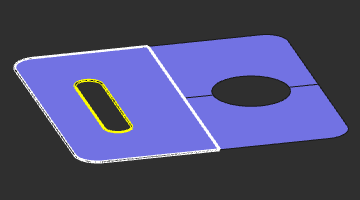
Die angegebene Begrenzung bezieht sich stets auf die ausgewählte Oberfläche. Wenn das Werkstück mehrere Bereiche von Flächen, die Anzeige und damit das Ergebnis können anders ausfallen als erwartet.
Bearbeiten
Um bestehende Prozessgeometrie zu bearbeiten, muss das Pie-Menü auf der zu ändernden PG geöffnet werden. Bei einer Oberflächen-Prozessgeometrie öffnet sich das Pie-Menü:



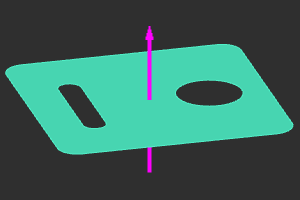
Normale Richtung
Auf dem angezeigten Normalrichtungsvektor kann ein Pie-Menü aufgerufen werden.


Referenzflächenbereich
Um die Konturprozessgeometrie außerhalb der Grenzen der Referenzfläche zu erweitern, kann dieser Referenzbereich modifiziert werden. Das Pie-Menü auf der Referenzfläche muss aufgerufen werden.