Rahmenattribute
Rahmenattribute
Der Rahmen verfügt über die folgenden Basisattribute. Bei der Erstellung des Rahmens werden die Standardwerte für die Attribute vom Softwareprogramm festgelegt, abhängig von der Wahl des Rahmentyps. Die Attribute werden in einer der Dashboard-Funktionen der verschiedenen Arbeitsbereiche angezeigt und können dort bearbeitet werden, die die Erstellung von Rahmen unterstützen.
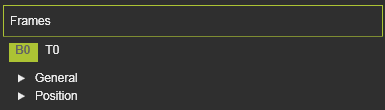
Der Frames-Container öffnet sich mit einer vertikalen Liste aller im Bauteil definierten Attribute, die durch ihre Namen angezeigt werden. Die Auswahl eines dieser Attribute zeigt dessen Eigenschaften, sortiert in zwei Gruppen. Eine Hervorhebung mit einem Kreuz erscheint in der 3D-Ansicht sowie das Dashboard-UI.
| Attribut | Beschreibung | Bemerkung |
|---|---|---|
 | ||
| Name | Der Name des Rahmens. | Ein leerer Name ist zulässig. |
| Typ | The type of the frame according to the classification as described above.  | |
| Vision-Rahmen | Der Rahmen wird als zusätzliche Werkzeugreferenz zugewiesen. | Gilt nur für (Ressourcen-)Werkzeugvorrichtungsrahmen. Vision-Rahmen werden in verschiedenen Anwendungen, Technologien oder Funktionen für spezielle Lösungen verwendet, wie z. B. die Kalibrierung der Lichtbogenschweißnaht. |
 | ||
| X, Y, Z | Die X-, Y- und Z-Koordinaten des Rahmens. | Die Koordinaten sind auf das globale Koordinatensystem der Komponente eingestellt. |
| Roll (X), Nick (Y), Gier (Z) | Die Roll-, Nick- und Gierausrichtung des Rahmens. | Die Orientierungwinkel werden auf das globale Koordinatensystem der Komponente eingestellt. |
Weitere Informationen zur Rahmenreferenz

Was this page helpful?