Entfernen Sie die Flächen

Der Remove the faces-Befehl entfernt die ausgewählten Flächen vom Körper. Grundsätzlich ist dies der umgekehrte Vorgang zum Erstellen eines verbundenen Ergebnisses aus den verbleibenden Flächen, kann jedoch in einigen Fällen schneller funktionieren.
Nachdem der Befehl gestartet wurde, erscheint ein kleines Fenster.
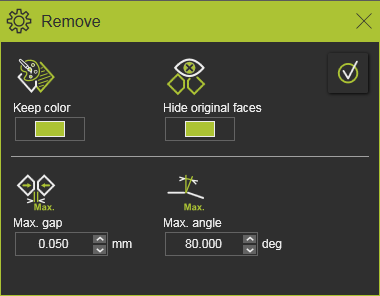
| Visualisierung | ||
 | Farbe beibehalten | Der Ergebnis-Körper der verbundenen Flächen wird die gleiche Farbe haben wie die Fläche, von der aus der Befehl ausgeführt wurde. |
 | Originalflächen ausblenden | Die ursprünglichen Flächen des Ergebnis-Körpers werden in den Ausblend-Arbeitsbereich verschoben. |
| Ausbreitungskriterien | ||
 | Max. Spalt | Die Propagation verbindet die angrenzende Fläche, wenn der Abstand zwischen den Kanten kleiner als der definierte Distanzwert ist. |
 | Max. Winkel | Die Ausbreitung verbindet die angrenzende Fläche, wenn der Winkel zwischen beiden Kantennormalen kleiner als der definierte Wert ist. |
Bevor das Entfernen ausgeführt wird, kann die Flächenauswahl erweitert oder reduziert werden.
Mit der CTRL-Taste können zusätzliche Flächen zur Auswahl hinzugefügt oder vorgewählte Flächen aus der Auswahl entfernt werden. Und durch die Nutzung der Fangfunktionen kann die Auswahl mit einer Zieh- und Ablegeoperation erweitert werden.
Die Auswahl kann auch über Propagation erweitert werden. Dazu muss das Kreis-Menü auf einer ausgewählten Fläche aufgerufen werden.

 Manipulator aktivieren
 Den gesamten Körper einschließen
 Fortpflanzung nach Farbe
 Fortpflanzung basierend auf Kontinuität
 | Nicht anwendbar für den Befehl Entfernen. | |
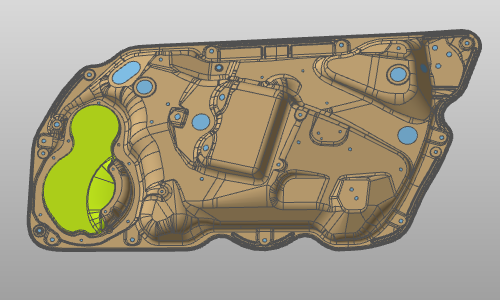
 | Fortpflanzung nach Farbe | Wählt alle angrenzenden Flächen mit derselben Farbe unter Berücksichtigung der anwendbaren Propagationsparameter aus. |
 | Fortpflanzung basierend auf Kontinuität | Wählt alle angrenzenden Flächen unter Berücksichtigung der anwendbaren Propagationsparameter aus. |

Nachdem die Auswahl abgeschlossen ist, wird die Entfernung durch Drücken der Execution-Taste in der oberen rechten Ecke des Fensters berechnet.
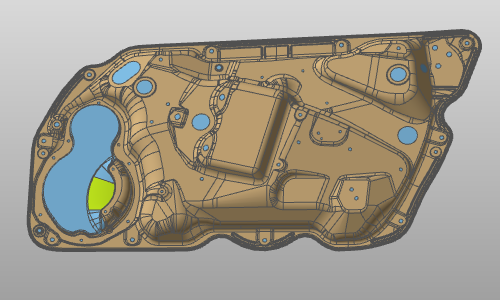
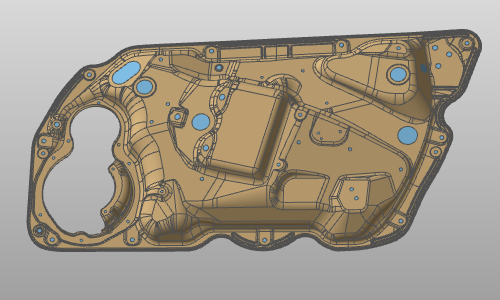
Beispiel:
| Entfernung starten | Fortpflanzung nach Farbe | Entfernte Flächen |
|---|---|---|
 |  |  |