Simulationsmonitor

Armaturenbrett
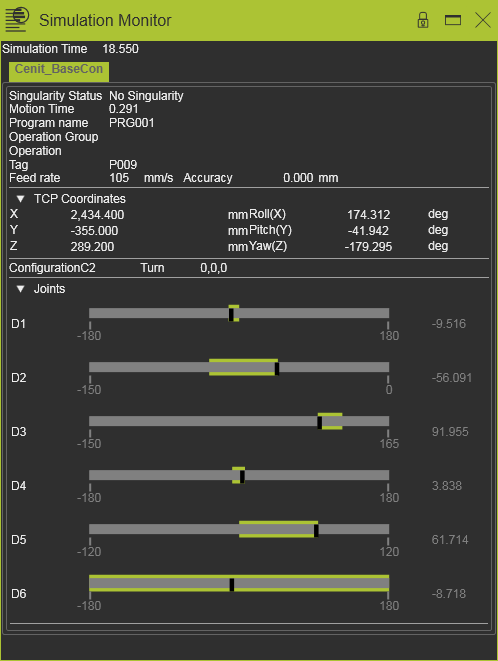
Das Simulation monitor öffnet ein Informationsfenster, das parallel zur Simulation läuft. Es zeigt den Betriebszustand der Fertigungsressourcen, wie die Werkzeugposition, Achsbewegung, Signalzustand und die verstrichene Simulationszeit, wie im folgenden Beispiel. Es verfügt über keine Bearbeitungsfunktion.
Im Monitor werden folgende Informationen angezeigt.
| Simulationszeit | Die verstrichene Simulationszeit des Programms. |
| Aktiver Controller | Die oberste Zeile zeigt den aktiven laufenden Controller an. Wenn die Simulation mehrere Controller ausführt, werden diese hier aufgelistet. Ein anderer Controller kann hier ausgewählt werden, um dessen laufendes Programm zu überwachen. |
| Singularitätsstatus | The singularity status of the production resource is written here. In case of issues the status returns with a corresponding message, like in the example below:  |
| Bewegungszeit | Die verstrichene Bewegungszeit bis zum nächsten Werkzeugbahn-Element. |
| Programmname | Der Name des simulierten Programms. |
| Operationsgruppe | |
| Vorgang | |
| Kennzeichnung | Der Name des Werkzeugbahn-Elements (Tag), dem sich der TCP nähert. |
| Vorschubgeschwindigkeit | Die Geschwindigkeit des TCP. |
| Genauigkeit | Die Genauigkeit zur Annäherung an das Tag. |
| TCP-Koordinaten | Die Koordinaten und die Rotation des TCP während der Simulation. Alle bezogen auf das Basis-Koordinatensystem. |
| Konfiguration | Die Konfiguration der Produktionsressource. |
| Drehung | Die Drehung der Produktionsressource. |
| Gelenke | Die Gelenkachsenwerte während der Simulation. |
Gelenke

Jedes Gelenk wird in diesem Abschnitt des Monitors angezeigt. Davor ist dessen Name platziert. Die horizontale Leiste mit den numerischen Werten stellt die Bewegungsgrenzen dieses Gelenks dar.
Während der Simulation zeigt das schwarze Rechteck den aktuellen Wert des Gelenks an. Dieser Wert wird auch auf der rechten Seite angezeigt. Das Rechteck bewegt sich entlang der Leiste, wenn sich das Gelenk bewegt.
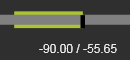
Während das Rechteck entlang der Leiste gleitet, erscheint hinter der grauen Leiste eine grüne Leiste. Diese grüne Leiste zeigt den maximalen Bereich an, den das Gelenk während der Simulation bisher erreicht hat. Wenn Sie mit der Maus über diese grüne Leiste fahren, werden die erreichten Werte numerisch angezeigt, wie im folgenden Beispiel.