Ereignisse
Werkzeugweg-Ereignisse
Ereignisse sind Anweisungen zur Definition bestimmter Aktionen, die an einem Werkzeugweg-Element oder einem Werkzeugweg-Bereich angewendet werden sollen. Sie können in eine Reihe von Basisanweisungen und eine Reihe von technologiespezifischen Anweisungen unterteilt werden. Die Software weist bestimmte Ereignisse automatisch zu, wenn ein Werkzeugweg berechnet wird. Diese Ereignisse sind schreibgeschützt. Der Benutzer kann jedoch auch Ereignisse manuell festlegen.
Ereignisse können an dem grauen, kreisförmigen Symbol erkannt werden, das sich in der Nähe des Werkzeugweg-Elements befindet.
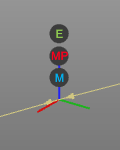
Die Ereignisse sind in drei Gruppen unterteilt, von denen jede einen eigenen Indikator besitzt:
 | Technologieereignis |
 | Bewegungsprofil-Ereignis |
 | Ereignis Positionsänderung |
Wenn Sie mit der Maus über dieses Ereignissymbol fahren, wird eine Liste mit dem Ereignisinhalt angezeigt, wie im folgenden Beispiel.
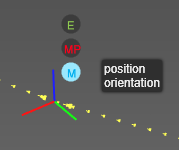
Die folgenden Basisevents stehen zur Verfügung:
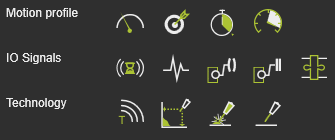
| Bewegungsprofil | ||
| Geschwindigkeit |  | Legt die Geschwindigkeit (mm/s) des Werkzeugs entlang des Pfads fest. |
| Genauigkeit |  | Legt die Genauigkeit (mm) fest, um die Position des Werkzeugbahn-Elements zu erreichen. |
| Verweildauer |  | Legt eine Wartezeit (s) am Pfadelement fest, während der das Werkzeug an der Position verbleibt, bevor es weiterbewegt wird. |
| Beschleunigung |  | Legt die Beschleunigung (mm/s²) des Werkzeugs fest. |
| E/A-Signale | ||
| Auf Signal warten |  | Fügt ein Ereignis zum Warten auf ein Eingangssignal des aktiven Controllers hinzu. |
| Signal setzen |  | Fügt ein Ereignis zum Setzen eines Ausgangssignals des aktiven Controllers hinzu. |
| Ressourcenanschluss setzen |  | Legt einen Port einer Ressource fest. |
| Auf Ressourcenschnittstelle warten |  | Wartet auf einen Port einer Ressource. |
| Adapter-Akteur |  | Setzt ein Signal eines mechanischen übergeordneten Adapters, um während der Simulation eine mechanische Verbindung zu erstellen oder zu löschen. |
| Technologie | ||
| Text |  | Fügt einen Kommentar ein. |
Andere Technologieereignisse hängen vom aktiven Technologiepaket ab.
