Adapterverbindungen
Adapter verbinden
Adapter sind sehr nützlich, um Komponenten einfach zusammenzufügen und ein Layout zu erstellen. Vor allem jedoch schafft der Adapter beim Erstellen des Layouts eine sinnvolle Verbindung zwischen den zusammengebauten Komponenten.
Die folgenden Verbindungen können hergestellt werden
| Typ | Beschreibung | Zwischen | Und |
|---|---|---|---|
| Mechanisch | Um eine untergeordnete Ressource mit einer übergeordneten Ressource zu verbinden, damit sich die untergeordnete Ressource zusammen mit ihrer übergeordneten Ressource bewegt. | Kinematische Vorrichtung | Kinematische Vorrichtung |
| Elektrisch | Eine Kommunikationsverbindung zur Steuerung der Ressourcenaktivitäten oder zur Steuerung eines anderen Controllers. | Steuerungseinheit | Ressource oder Controller |
| Fluss | Um den Transport eines Werkstücks von einer Ressource zu einer anderen Ressource zu definieren. | Transportressource | Transportressource |
| Transport | Um ein Werkstück in einer starren, stationären Ressource zu bewegen oder eine automatisierte Zielerkennung zu ermöglichen. | Kinematische Vorrichtung | Werkstück |
Eine ordnungsgemäße Verbindung kann nur zwischen zwei passenden Adaptern hergestellt werden: gleicher Typ und Steckdosen-Stecker-Kombination. Andere Kombinationen werden abgelehnt.
Die Steckverbindung der Adapter definiert auch die Abhängigkeitsrichtung. Nach dem Verbinden wird der Buchsenadapter zum übergeordneten Element und übernimmt somit die Steuerungsfunktion innerhalb der Verbindung.
Mechanische Verbindungen
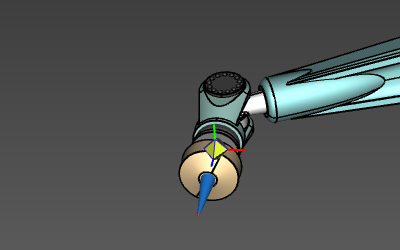
Die zentrale Kugel des Manipulators unterstützt nur eine Auswahl- und Ziehoperation. Während das left mouse button gedrückt gehalten wird, kann der Manipulator an jede beliebige Position in der 3D-Ansicht gezogen werden, jedoch selbstverständlich parallel zur Bildschirmfläche. Seine Position basiert auf der Mausposition auf dem Bildschirm, und die Koordinaten werden entsprechend berechnet. Während des Ziehvorgangs ändert sich die Manipulator-Grafik zu einer einfachen Koordinatensystem-Grafik, dargestellt durch drei farbige Achsen.
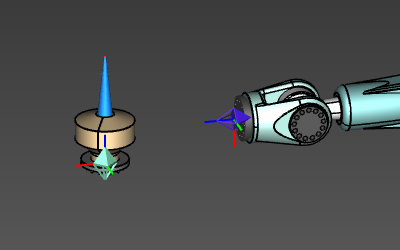 | 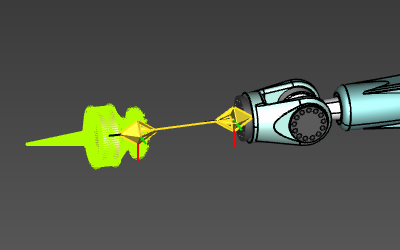 | 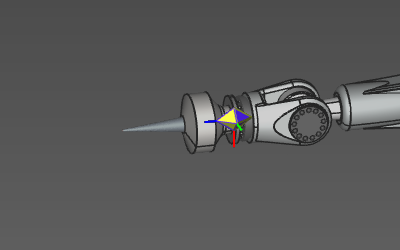 |
Das Einrasten eines Buchsenadapters auf einen Steckeradapter wird ebenfalls unterstützt. In diesem Fall wird die übergeordnete Komponente auf der untergeordneten Komponente positioniert.
Das Trennen der Verbindung kann durchgeführt werden, indem die Kindkomponente ausgewählt und vom Elternelement weggezogen wird, sodass sie außerhalb der Reichweite des Verbindungsstrahls liegt.
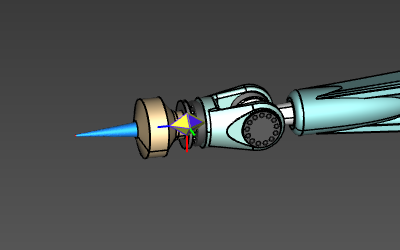
Eine mechanische Verbindung zwischen zwei Ressourcen erweitert die kinematische Kette der übergeordneten Ressource auf die verbundenen untergeordneten Ressourcen. Jede Bewegung der übergeordneten Ressource bewirkt automatisch eine entsprechende Bewegung der untergeordneten Ressource.
 |  |
Elektrische Verbindungen
Eine elektrische Verbindung wird hergestellt, wenn ein elektrischer Adapter auf einen anderen Adapter gezogen wird. Die Software versucht, eine passende Kombination von Steckdosen- und Steckeradaptern zu finden, indem sie innerhalb eines bestimmten 3D-Bereichs um den gezogenen Adapter nach einem Gegenstück sucht. Wenn eine Übereinstimmung gefunden wird, wird ein Verbindungsstrahl angezeigt, um die Übereinstimmung zu kennzeichnen. Das Loslassen oder Ablegen des Adapters erstellt dann diese elektrische Verbindung, und die Verbindungsleitung bleibt sichtbar.
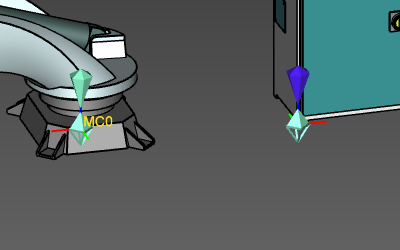 | 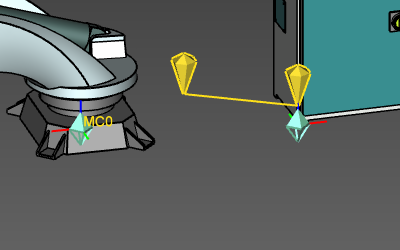 | 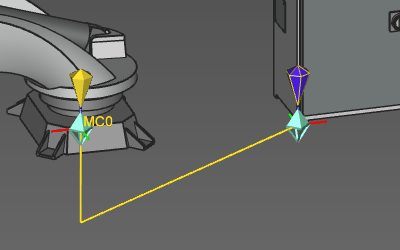 |
Eine elektrische Verbindung stellt die Kommunikation zwischen dem Controller und einer Ressource(n) oder einem anderen Controller her. Sie definiert die Signale und deren Wertzuordnung, die für Simulationszwecke verwendet werden.
Das Trennen einer elektrischen Verbindung kann nur mit dem Disconnect-Befehl im Pie-Menü des Adapters durchgeführt werden.
