Process simulation settings
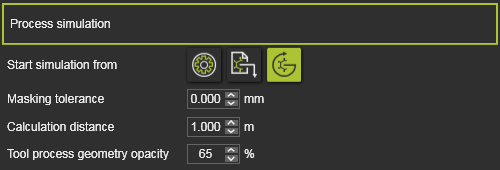
Here the process simulation settings are defined.
| Start simulation from | When the simulation is started, the physical parameter(s) on the process simulation object is calculated. The starting value of that parameter can be:  Initial value of process simulation object Initial value of process simulation object  Value as stored in the workpiece document Value as stored in the workpiece document  Continue from current value Continue from current value |
| Masking tolerance | When overlapping elements are masking the process simulation object, the simulation will ignore these masking elements that lie within the tolerance field. |
| Calculation distance | The maximum length, as seen from the technology reference frame, to where the tool process model reaches. For example the cone length of a spraying brush. |
| Tool process geometry opacity | The opacity of the 3D geometry that represents the tool process model during the simulation, like for example a spray painting cone. |
More reference information

Was this page helpful?