Fixture properties - weight reduction

Weight reduction
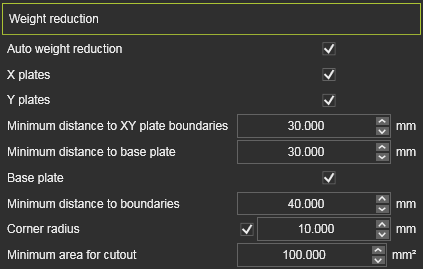
This container includes all settings for remove material on the support and base plates to reduce the weight of the fixture. The weight reduction is applied by default on the support plates in the X and Y direction, but can be activated for the base plate as well. The weight reduction is applied by removing material in a grid pattern, where the minimum distance to the plate boundaries and to the other plates can be defined. The cutouts are generated with a corner radius to avoid sharp edges and a minimum area can be defined to avoid small cutouts that do not contribute much to the weight reduction but increase the complexity of the fixture design and manufacturing.
| Attribute | Description | Remark | |
|---|---|---|---|
| Auto weight reduction |  | Activates the calculation to remove unnecessary material in the plates to reduce the weight of the fixture. | |
| X plates |  | Apply the weight reduction to the support plates in the X direction. | |
| Y plates |  | Apply the weight reduction to the support plates in the Y direction. | |
| Minimum distance to XY plate boundaries |  | The minimum distance to be kept to the plate boundary, i.e. the minimum width after weight reduction. | Value ≥ support plate thickness. |
| Minimum distance to base plate | 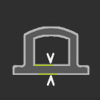 | The minimum distance to be kept to the base plate. | Value ≥ 1.5 * engraving height. |
| Base plate |  | The weight reduction is computed for the base plate. | |
| Minimum distance to boundaries |  | The minimum distance to be kept to the XY plates. | Value ≥ 1.5 * engraving height. |
| Corner radius |  | Switch and value to generate a corner radius at all sharp edges of the weight reduction cut out. | Value ≥ 0 mm. |
| Minimum area for cutout |  | The minimum area of the weight reduction cut out. If this size is not reached, the cutout will not be applied. |
Was this page helpful?