Plate nesting properties

Dashboard
The Nesting properties command opens the dashboard with the sheet and nesting dimensions. Furthermore there is a container with specific attributes for the export of the nesting to a DXF file.
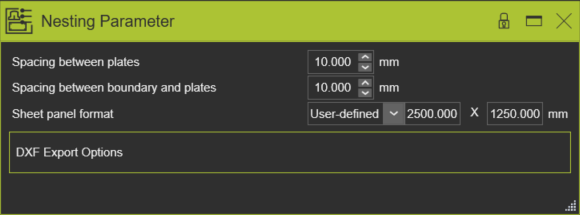
After changing any value or parameter in the dashboard, an update of the nesting layout needs to be executed manually. Only then the changes will take effect. With this behavior it is possible to modify multiple values and update the nesting for all changes in a single step.
General
Here the global nesting attributes are defined.
| Attribute | Description | Remark | |
|---|---|---|---|
| Spacing between plates |  | The minimum distance between the nested plates on the sheet. | Value ≥ 0 mm. |
| Spacing between boundary and plates |  | The minimum distance between the nested plates and sheet edges. | Value ≥ 0 mm. |
| Sheet panel format |  | The size of the sheet for nesting the plates. A drop down list of predefined sizes or to set a user defined size. 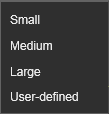 | Small = 2.000 x 1.000 mm Medium = 2.500 x 1.250 mm Large = 3.000 x 1.500 mm When the plates do not fit on one single sheet, the system will automatically define an additional sheet to nest until all plates have been processed. When a plate is too large to fit on the selected sheet size, with taking into account the nesting dimensions, an error message appears. |
DXF export options
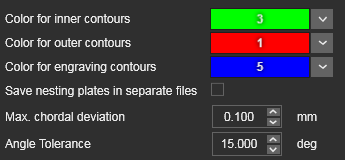
This container opens the attributes for the export of the nesting result in the external format 2D DXF.
| Attribute | Description | Remark | |
|---|---|---|---|
| Color |  | The color assigned to the different type of countours. | |
| Save nesting plates in separate files | Switch to create separate DXF files for each individual nested plate. | ||
| Max. chordal deviation |  | Maximum deviation between original contour and approximated result. | For DXF output the contour needs to be approximated into lines and circular arcs. Approximation only applies to the contour of the plates, where they support the workpiece. All remaining plate contour areas already are designed as lines and arcs. |
| Angle tolerance |  | Angular tolerance to merge contour elements. | Before approximation, the contour elements are merged together. Merging the elements continues as long as the tangent deviation between two subsequent elements is smaller than the tolerance. |
Was this page helpful?