Ref_OLP_ToolpathOptim_AppRet
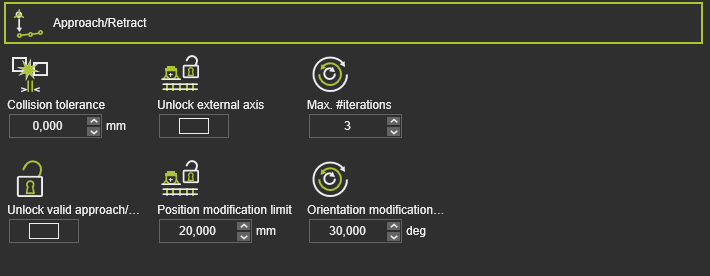
By default not all attributes are being displayed. It is limited to the most common applied ones. Switching the Expert mode button at the top right of the dashboard will expand the container to show all available attributes.
The Approach/Retract defines what modifications can be made to the toolpath elements to search for the optimal collision free and reachable solution. It shows all variables that can be included in the optimization process.
The parameters to control the approach/retract optimization:
| Parameter | Description | Remark | Mode | |
|---|---|---|---|---|
 | Collision tolerance | Defines additional safety distances for the approach and retract motions | Switch to include it in the optimization process. This value is also added to the process points. | |
 | Unlock external axis | Switch ON to unlock the external axis during path searching. | If the external axis changed during approach/retract motion, the axis is locked to this interval by default. If the external axis does not change, it is locked to this value. | Expert |
 | Max. #iterations | Defines number of loops for the internal optimizer. | This can be set to a higher value for stronger optimization. | Expert |
 | Unlock valid approach/retract | Switch ON to allow that optimization move all points | By default, the valid approach/retract points are not optimized. Only unreachable points or points with collision are modified. | Expert |
| Position modification limit | Defines the Cartesian range of allowed modifications of the approach/retract points position. | Expert | |
| Orientation modification | Defines the Euler angle range of allowed modifications of the approach/retract points orientation. | Expert |
Was this page helpful?