Suppress and / or remove a toolpath element

This command includes two actions; suppress and remove.
The in-process toolpath positions that are computed with the programming attributes and parameters cannot be deleted because they are part of the base calculations. The command will suppress them, which means that the position, the element, remains present but is de-activated and no longer part of the final toolpath. The suppressed element will be displayed in a low-light mode and the toolpath is recomputed immediately.
| In process | Suppressed |
|---|---|
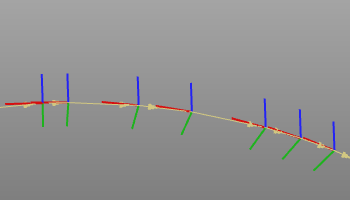 | 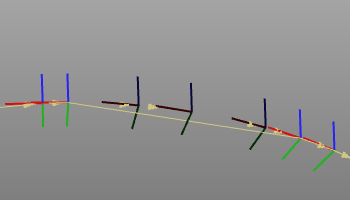 |
Manually created process insert positions and interactive teach positions however will be removed from the toolpath completely with this command.

The suppressed tool path element can be re-activated by executing the command again on the suppressed element.
The command supports multiple selection of toolpath elements to be suppressed, removed or unsuppressed simultaneously.