Edit the toolpath element position

This command is only available when the pie menu is called for on a Cartesian coordinate or Rotation angle value in the toolpath dashboard.
The command opens a small panel to define the teach modification.
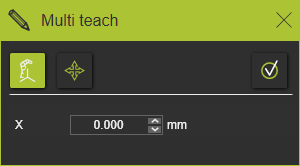
In the top menu row two methods to switch between are present of how the modification will be applied:
 | Absolute position The value that is inserted is the absolute position or angle, defined in the current project base frame coordinate system. |
 | Relative position The value that is inserted is a displacement or rotation from the current position, with the base frame as reference. |
Below the menu split line, the name of the parameter (coordinate or angle) is being displayed together with the entry field to edit the value.

With the Execution button in the menu row the teach modification will be applied, after which the panel closes.
A shortcut for the Execution button is using the  key on the keyboard.
Was this page helpful?