Geometry comparison

The Comparison command can be used to compare two geometrical objects with each other. Typically applied to look for the differences between two workpieces.
On the outer skin of both objects a triangular mesh is generated. Then these meshes are compared, but always having the root of the object as reference. This enables to compare geometry that is (partially) lying on top of, or close to each other, as well as two components inside a layout that not necessarily are located at the same position.
The result of the comparison is displayed on the initial object, the object from where the command has been executed. The green area indicates the common part of the objects, the red/orange area indicates the differences. In the example below the parts are placed aside of each other to visualize the comparison result better. A comparison can be initiated in both directions, obviously.
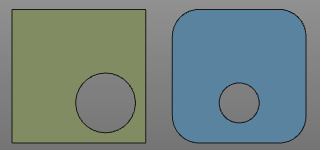
| Compared from left to right | Compared from right to left |
|---|---|
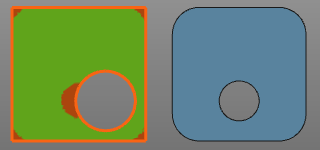 | 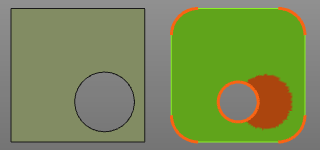 |
A comparison remains visible of the component, even when switching to another workbench or command. The comparison has to be terminated interactively.
On the initial object the Pie menu opens with following functions.