Edit the name of the program, the group or the operation

With the Edit command the name of the program, operation group or operation can be modified.
After the command has been started the name field switches to edit mode. Changes can be made now. Clicking outside the object closes the edit mode.
 |  | 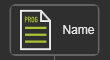 |
Alternatively the edit mode can also be started when clicking in the name filed directly.
Was this page helpful?