Import paths

The Import command is there to collect all the required paths from a pre-defined text file.
In the text file, the paths and folders are separated with a semicolon ;. Paths that need to be imported with all the sub folders are given a + character in front of the path name.
| Text file | Import result |
|---|---|
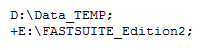 |  |
Paths that already exist in the list will be ignored while importing. New paths will be added.
As a consequence of the above, missing sub folders in the list are not re-assigned with the
import. The main path member needs to be deleted first and then added again, either with the Add tree path command or the Import command.
Was this page helpful?