Save the project

With this Save project command from the function toolbar the OLP project will be stored on disk as a project type .cenprj file. A file browser will be opened to define the location where to store the file and under what name.
The project file is the collection of the layout (the workcell), the workpiece on which the manufacturing operation has been applied and the created programs.
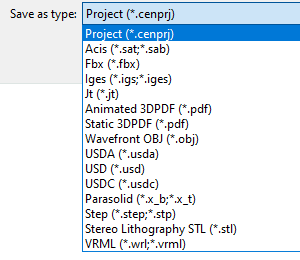
Furthermore the command supports to possibility to save the document in another (CAD typical) format. The other format can be selected from the drop down list in the option Save as type. When applying one of the other CAD formats, the save operation will store all the resources, controllers and workpieces from the project.
Animated exports are supported with the 3DPDF and USD formats.
A simulation then is required to the export. If that simulation is not available, the system will automatically execute it, prior to the save operation.