Keyboard shortcuts

For convenience reasons there are several commands and interactions that can be started directly with a combination of keyboard keys. With this command the Keyboard shortcuts are defined. Some of them are predefined by the software and have fixed key combinations, others are open for users to set their preferred keyboard shortcut.
The command opens a window with all keyboard shortcuts.
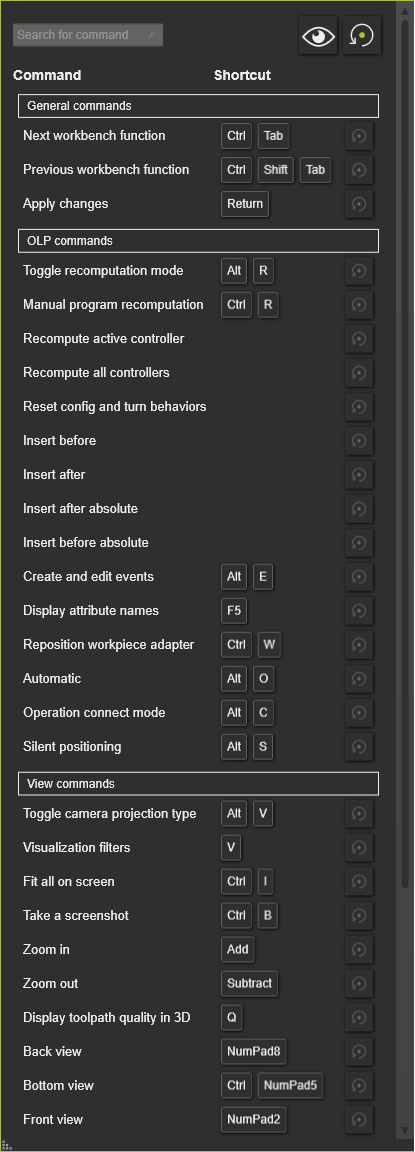
The global interaction with this window:
 Search Search | Searches in the list for the inserted short cut name. |
 Show all Show all | Shows the full list of all available definitions. Pressing the button a second time reduces the list back to the start-up display. |
 Reset Reset | Resets all short cuts back to the system default values. |
The editable short cuts can be modified by picking it in the window. The current short cut is then removed. By simply typing the preferred short cut on the keyboard will set the new combination, but only if still available.
When the entered short cut cannot be resolved, it will be marked with a red rectangle and a warning appears. Like in the example below.
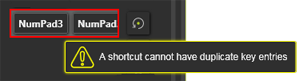
Each editable short cut can be reset individually to its system default with the small local Reset button that is located behind the short cut.
Available shortcuts
| Command or Interaction | Shortcut | |
|---|---|---|
| General commands (partially fixed) | Next workbench function |  + +  |
| Previous workbench function | +  + + | |
| Apply changes |  | |
| Cancel changes |  | |
| Copy | +  | |
| Paste | +  | |
| Undo | +  | |
| Redo | +  | |
| Open user manual |  | |
| Open pie menu |  | |
| Open file | +  | |
| Add existing objects | +  | |
| Save document | +  | |
| Mode commands (fixed) | Normal mode | +  |
| Geometry mode | +  | |
| Drag & snap mode | +  | |
| Collision groups mode | +  | |
| Swept volume mode | +  | |
| Interaction mode | +  | |
| Measurement | +  | |
| OLP Commands (editable) | Toggle recomputation mode |  + +  |
| Manual program recomputation | + | |
| Recompute all controllers | ||
| Recompute active controller | ||
| Reset config and turn behaviors | ||
| Insert before | ||
| Insert after | ||
| Insert before absolute | ||
| Insert after absolute | ||
| Create and edit events | +  | |
| Display attribute names |  | |
| Reposition workpiece adapter | +  | |
| Operation connect mode | + | |
| Silent positioning (teach positioning mode) | + | |
| Automatic (toolpath modification apply mode) | + | |
| Step commands (fixed) | Back |  |
| Jump back |  | |
| Forward |  | |
| Jump forward |  | |
| View Commands (editable) | Toggle camera projection type | + |
| Visualization filters | | |
| Fit all on screen | +  | |
| Take a screen shot | +  | |
| Zoom in |  | |
| Zoom out |  | |
| Display the quality on the 3D toolpath |  | |
| Back view | Numpad  | |
| Bottom view | + Numpad | |
| Front view | Numpad | |
| Left view | Numpad | |
| Right view | Numpad | |
| Top view | Numpad | |
| Isometric symmetrical | Numpad | |
| Isometric asymmetrical | ||
| Trimetric symmetrical | ||
| Trimetric asymmetrical | ||
| Dimetric symmetrical | ||
| Dimetric asymmetrical |