Save the resource

With this Save As command from the function toolbar the resource will be stored on disk as a resource type .cenres file, ready for use in a layout. A file browser will be opened to define the location where to store the file and under what name. The initial document name is the name that has been given to the resource. At creation a system default name is given, but it can be modified in the resource dashboard before saving the document.
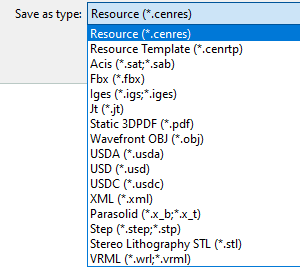
The resource can also be stored on disk as a resource template type .cenrtp file, ready for being used as a template for new resources that have the same or almost the same definition.
Furthermore the command supports to possibility to save the document in another CAD typical or neutral format. The other format can be selected from the drop down list in the option Save as type.
Saving (exporting) the resource in XML format will not store the geometry of the resource.