Simulation start state manager

Reference guide \ Simulation \ Simulation start state
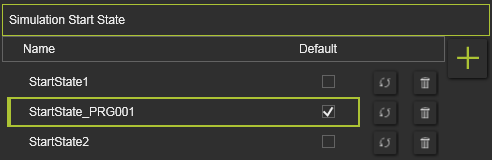
The default start state can be defined here just by setting the Default check box. It is obvious that only one state can be set default.
At creation, the start state is given a standard name. This name can be modified by double clicking on it and altering the text.
Start States can be managed here.
 | Add | Add the current position of all components as a new start state. |
 | Remove | Remove the selected start state from the list. |
 | Update | Update incomplete state state information. |
Although it does not set the start state as default, selecting a start state in the list will change the 3D layout to this state.
Was this page helpful?