Contour selection

Create
Surface edges are the input to generate contour shaped process geometry.
On the selected edge the Pie menu has to be called to create the process geometry.



With the Pie menu the parent surface of the selected edge shows the possible solution. This is the boundary of the surface, indicated in white. This boundary is the result of the internal contour search engine.
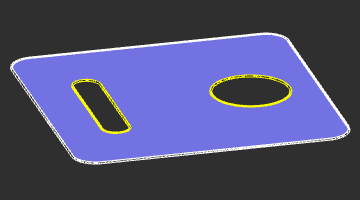
The indicated boundary always refers to the parent surface of the selected edge. If the workpiece contains multiple domains of surfaces, the indication and with that the result might be different then expected.
Edit
While creating a contour based process geometry, it still can be modified. To edit existing process geometry the Pie menu has to be opened on that PG that is going to be modified.



In editing mode the process geometry shows the result of the contour search engine. Via the control points, the contour element and the normal direction markers changes can be made.
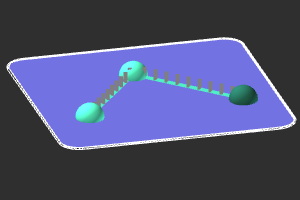
Control point
New control points can be added to the contour. Picking a position on the contour search result will add a control point in between two existing ones. Picking a new position on the reference surface of the contour will extend the existing one.
A Pie menu on a control point offers additional functionality to edit the contour.



Contour search
The contour is the result of the search engine. The software supports different search strategies. Via the Pie menu on the contour element the strategy can be changed to modify the result.



Normal direction
With the display of the contour search result the normal direction of the contour is shown as well. A Pie menu on these direction markers opens functionality to modify the normal direction of the process geometry.