Modify the tower

With the Modify the tower command, the tower shape can be changed. The parameters panel appears.
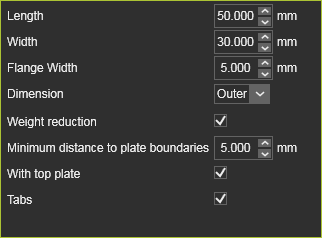
| Parameter | Description | Remark | |
|---|---|---|---|
| Length | The size of the tower in U-direction of the manipulator. | ||
| Width | The size of the tower in U-direction of the manipulator. | ||
| Flange width | The exterior flange on the tower plates for the interlocking shape of the plates. | Value ≥ 2,0 mm. | |
| Dimension | The length and width dimension, measured on the interior or outer boundary of the tower. | ||
| Weight reduction | Option to calculate to remove unnecessary material in the plates to reduce the weight of the tower. | ||
| Minimum distance to plate boundaries | The minimum distance to be kept to the plate boundary, i.e. the minimum width after weight reduction. | ||
| With top plate | The tower includes a flat top plate to close its interior. | ||
| Tabs | The tower plates include tabs at the bottom to position the tower on the base plate. |
Any modification can be made in the panel, multiple modifications when needed. With a mouse click outside the panel all changed will be executed, after which the panel closes and the command has been completed.
Was this page helpful?