Composez la mise en page

Compose
La commande Move components n’exécute pas de fonction directe au démarrage.
La commande permet une fonction rapide et facile de glisser-déposer des composants dans la disposition active.
Position des composantes
Les composants géométriques sont attrapés avec le bouton gauche de la souris et peuvent être déplacés vers une autre position dans le monde 3D en relâchant le bouton de la souris. L’orientation ne change pas. Dans tout affichage 3D, les composants sont glissés dans le plan XY. Dans toute vue iso, activée au niveau de la boussole de vue, le déplacement des composants se fait dans le plan normal vers cette vue iso.
Pour permettre le traînement vers des positions prédéfinies dans le plan XY global, la grille de disposition peut être utilisée.
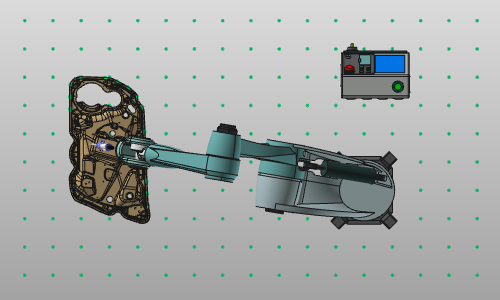
En appuyant sur la touche  tout en faisant glisser le composant, la grille de disposition s’affiche et le composant est relâché sur le point de grille le plus proche. Cette grille peut également être activée de façon permanente, c’est-à-dire affichée à l’écran, dans le tableau de bord Display Filter.
Lorsqu’un composant est saisi, le mouvement Manipulator s’affiche automatiquement pour supporter l’opération de traînée.
Pour déplacer une sous-disposition à l’intérieur de son parent, la racine de cette sous-disposition peut être sélectionnée. Le mouvement Manipulator apparaît sur cette image pour repositionner toute la sous-disposition.
Seuls les composants ou sous-dispositions de la disposition active peuvent être déplacés ainsi.
Lien entre les composants
La fonction de glisser-déposer peut également être utilisée pour créer des connexions. Les connexions mécaniques entre les ressources sont établies lorsque, en traînant, le système trouve une connexion correspondante entre des adaptateurs mécaniques, indiquée par un faisceau de connexion. Les connexions électriques peuvent être établies en choisissant un adaptateur électrique et en le déposant sur un adaptateur électrique correspondant au composant récepteur.
En survolant un composant (ressource, contrôleur ou pièce de travail), un menu en pie d’édition de composant peut s’ouvrir.



Et en survolant un adaptateur d’un composant, un menu en tarte de l’adaptateur d’édition peut s’ouvrir.