Vue 3D
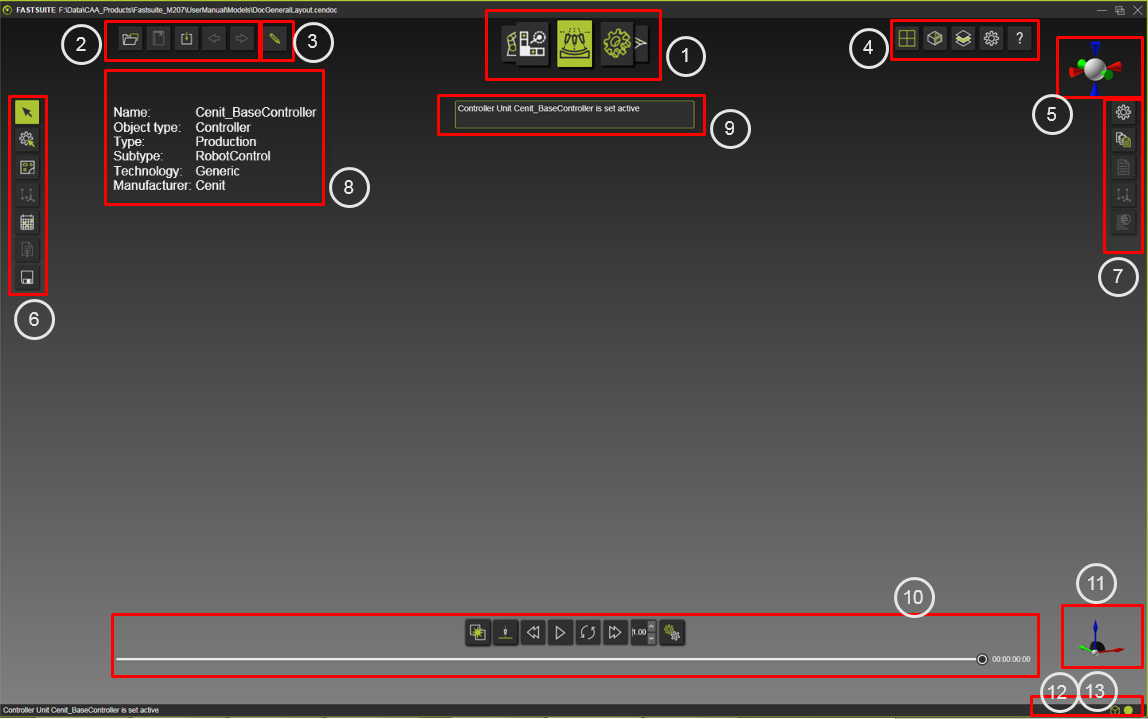
FASTSUITE L’Édition 2 possède une fenêtre principale, une seule interface utilisateur, appelée 3D View. Cette Vue 3D affiche non seulement le modèle tridimensionnel, elle intègre toutes les interactions utilisateur ainsi que toutes les autres barres d’outils de commandes. La Vue 3D est l’outil qui visualise, interagit avec, analyse et simule les modèles et les mises en page sur lesquels l’utilisateur travaille.
L’interaction utilisateur avec la Vue 3D est prise en charge par les appareils de poste de travail classiques souris et clavier.
La Vue 3D comporte plusieurs zones interactives où certaines commandes ou actions sont lancées. La Vue 3D elle-même est l’environnement où ont lieu toutes les interactions directes avec les objets 3D.
Zones interactives dans la vue 3D
L’emplacement des éléments numérotés est indiqué sur la photo ci-dessus.
1
2
3
4
5
6
7
8
9
10
11
12
13
Autres interactions en vue 3D

Plus d’informations
FASTSUITE Édition 2 HelpPages R2025.1.x
Version publiée : PV 1
Publish date : __