Annuler / Refaire

Undo

Redo
Les commandes Undo et Redo permettent de reculer ou d’avancer dans les actions déjà effectuées.
Chaque commande exécutée dans FASTSUITE Édition 2 sera stockée dans une liste interne. Avec la commande Annuler, il est possible de parcourir cette liste en commençant par la dernière opération exécutée jusqu’à la dernière de la liste. Bien sûr, dans le même ordre que les opérations ont été exécutées au départ, mais ensuite dans le sens inverse. En descendant cette liste avec les actions Annuler, il devient aussi possible de remonter vers le haut. Pour cela, la commande Redo doit alors être appliquée.
L’exemple suivant montre l’effet des commandes Annuler et Refaire :
| Début | Action (Supprimer) | Action (2e Élimination) | Annuler (2x) | Refaire (1x) |
|---|---|---|---|---|
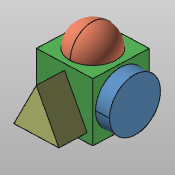 | 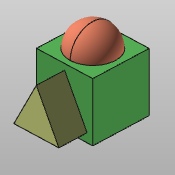 | 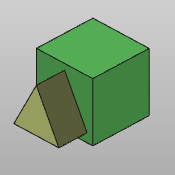 | | |
It has to be understood that the list of executed operations will always be extended from the last current position in that list.Thus when the user steps back in the list with a number of Undo actions and then continues his work with a new command, this new command becomes the next entry in the list. All previously possible Redo steps then no longer are available.
Keep in mind that at every change of Workbench all entries on the internal list of Undo and Redo actions are deleted. The list will be blank and recreated at the start of the newly opened Workbench..