Ouvre

Avec la commande Open, un nouveau document existant peut être chargé.
La commande ouvre un navigateur avec deux colonnes.
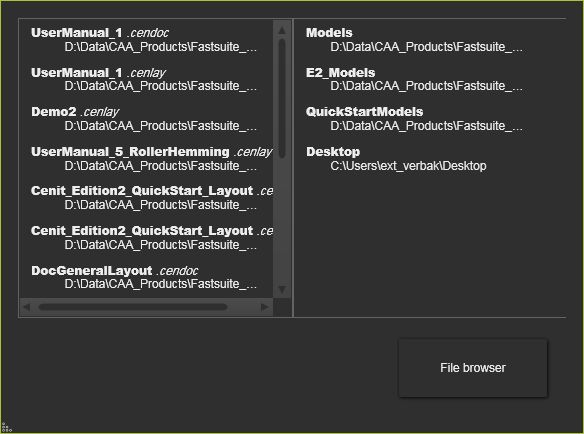
La colonne de gauche montre la liste des derniers documents ouverts. À partir de cette liste, le document sélectionné sera ouvert directement. La colonne de droite affiche une liste des derniers dossiers utilisés à partir des documents qui ont été chargés. Sélectionner un dossier dans cette liste ouvre un navigateur de fichiers standard à cet emplacement de dossier, pour ouvrir tout document disponible de ce dossier. Mais chercher dans d’autres dossiers reste bien sûr possible.
Le bouton  ouvre également un navigateur de fichiers standard, mais à l’emplacement racine du disque C. À partir de là, n’importe quel dossier accessible peut être ouvert pour ouvrir un document.
Lorsque l’ouverture du document ne réussit pas, un message d’échec apparaît. Si le logiciel ne trouve pas le(s) fichier(s) sous-jacent du document, le File Manager s’ouvrira pour que l’utilisateur décide comment continuer.
La commande Open peut également être lancée avec la combinaison de raccourcis clavier Ctrl + O.
La commande Open permet non seulement de charger FASTSUITE Edition 2 type de documents, mais aussi n’importe quel type de document (CAO) Type de document pris en charge par le logiciel.
Outre la commande Open pour charger un document, le logiciel prend également en charge la méthode du glisser-déposer charger le document directement tout en le faisant glisser d’un navigateur de fichiers ou d’un bureau vers la vue 3D. Mais l’effet de cette méthode est légèrement différent.
