Propriétés des objets de simulation de procédé

Tableau de bord
La commande Process simulation objects ouvre son tableau de bord.
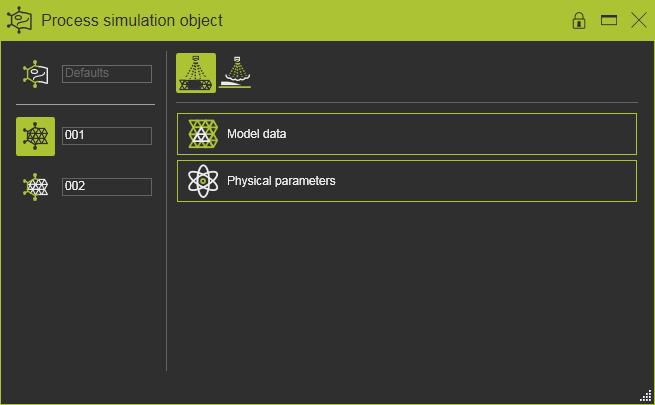
Le tableau de bord comporte essentiellement quatre sections d’informations et/ou d’interaction, séparées par des lignes séparées. En haut droit, une liste des procédés de fabrication disponibles (c’est-à-dire sous licence) pouvant être simulés est affichée. En dessous, les attributs du modèle de processus sélectionné sont affichés, triés dans des conteneurs séparés. Sur le côté gauche du tableau de bord, les objets de simulation de processus sont listés. Au-dessus, au-dessus de la ligne de séparation, les réglages par défaut peuvent être définis pour le modèle de processus actif et sélectionné. Ci-dessous, tous les PSO créés sur la pièce active sont listés.
Modèles de procédés
Tous les modèles de procédé sous licence sont affichés dans la rangée supérieure. L’icône surlignée indique le modèle de processus actuel dont les attributs sont affichés dans la section ci-dessous, comme dans l’exemple ci-dessous.
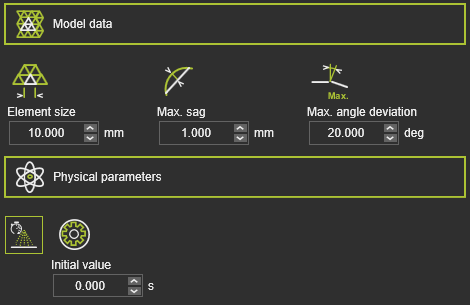
Chaque modèle de processus possède deux conteneurs d’attributs. Le conteneur Model data contient les attributs appliqués pour générer l’objet de simulation de processus. Chaque modèle de procédé sera calculé sur un élément géométrique spécifique : c’est-à-dire un point, un contour ou une surface. Ainsi, chaque modèle de processus aura ses propres attributs spécifiques de données de modèle qui génèrent l’objet de simulation de procédé.
Le conteneur Physical parameters contient tous les paramètres physiques du modèle de procédé pouvant être simulés. Pour chacun de ces paramètres, la valeur initiale peut être fixée. C’est la valeur de départ du paramètre lors de la génération de l’objet de simulation de procédé.
Défauts

Le Defaults est la section du tableau de bord où, pour chaque modèle de processus disponible, les valeurs par défaut des paramètres du modèle de procédé sont définies. Ces valeurs par défaut seront appliquées lorsqu’un nouvel objet de simulation de procédé sera généré.
Objets de simulation de procédé
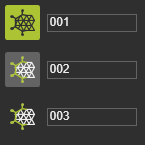
Sous les paramètres par défaut, la liste des objets de simulation de processus créés est affichée. Il contient tous les objets à l’intérieur de la pièce, quel que soit le modèle de procédé qui a été attribué à l’objet.
Choisir le champ nom de l’objet de simulation de processus permet à l’éditeur de modifier le nom lorsque nécessaire.
L’objet sélectionné est mis en surbrillance. De cet objet, les paramètres du modèle de processus actif sont affichés dans la rangée supérieure du tableau de bord. Lorsque plusieurs modèles de processus ont été attribués à l’objet, pour chacun de ces modèles, les paramètres peuvent être consultés et modifiés. La seule restriction ici est que l’objet ne peut avoir que des modèles de processus différents attribués ayant le même type de données de modèle.
Survoler l’objet ou en sélectionner un ici permet de faire des surlignements croisés sur l’objet correspondant dans la vue 3D et vice versa.
Sur l’objet se trouve également un menu en forme de pizza.