Événements
Événements sur le parcours d’outil
Les événements sont des instructions pour définir certaines actions à appliquer à un élément du chemin de l’outil ou à une région du chemin de l’outil. Ils peuvent être divisés en un ensemble d’instructions de base et un ensemble d’instructions spécifiques à la technologie. Le logiciel assigne automatiquement certains événements lors du calcul du chemin de l’outil. Ces événements sont protégés contre l’écriture. Mais l’utilisateur peut aussi définir des événements manuellement.
Les événements peuvent être reconnus par le symbole circulaire gris situé près de l’élément du trajet de l’outil.
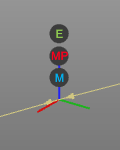
Les événements sont classés en trois groupes, chacun ayant son propre indicateur :
 | Événement technologique |
 | Événement de profil de mouvement |
 | Événement de modification de position |
En survolant ce symbole d’événement, une liste affichera le contenu de l’événement, comme dans l’exemple ci-dessous.
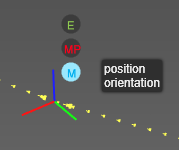
Les événements de base suivants sont proposés :
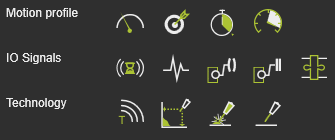
| Profil de mouvement | ||
| Vitesse |  | Règle la vitesse (mm/s) de l’outil le long du trajet. |
| Précision |  | Règle la précision (mm) pour atteindre la position de l’élément de trajet d’outil. |
| Dwell |  | Fixe un temps d’attente à l’élément de chemin pour que l’outil reste en position jusqu’à ce qu’il avance plus loin. |
| Accélération |  | Règle l’accélération (mm/s2) de l’outil. |
| Signaux d’E/S | ||
| Attendez le signal |  | Ajoute un événement d’attente pour un signal d’entrée du contrôleur actif. |
| Signal de réglage |  | Ajoute un événement de signal de sortie défini du contrôleur actif. |
| Définir le port de ressources |  | Définit un port d’une ressource. |
| Attendre le port des ressources |  | Il attend un port d’une ressource. |
| Acteur adaptateur |  | Définit un signal d’un adaptateur parent mécanique pour créer ou supprimer une connexion mécanique pendant la simulation. |
| Technologie | ||
| Texte |  | Insère un commentaire. |
D’autres événements technologiques dépendent du package technologique actif.
