Attributs de l’adaptateur
Attributs de l’adaptateur
L’adaptateur possède les attributs de base suivants. Lors de la création de l’adaptateur, les valeurs par défaut des attributs sont données par le logiciel, selon le type d’adaptateur choisi. Les attributs sont affichés et modifiables dans l’une des fonctions du tableau de bord des différents établis qui supportent la création d’adaptateurs.
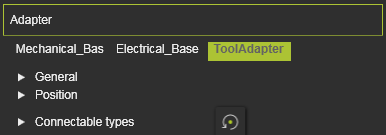
Le conteneur Adapter s’ouvre sur une liste verticale avec tous les attributs définis au sein du composant, indiqués par leurs noms. En sélectionnant l’un d’eux, ses attributs sont classés en deux groupes. Un surlignage croisé dans la vue 3D et l’interface du tableau de bord apparaît.
| Attribut | Description | Remarque |
|---|---|---|
 | ||
| Nom | Le nom de l’adaptateur. | Un nom vierge est autorisé. |
| Type | The type of the adapter according to the classification. 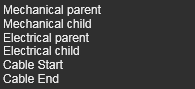 | |
| Capacité | Définit combien d’adaptateurs peuvent être connectés à celui-ci. | Cela ne concerne que les adaptateurs de type douille. |
 | ||
| X, Y, Z | Les coordonnées X, Y et Z de l’adaptateur. | Les coordonnées sont définies selon le système global de coordonnées du composant. |
| Roulis(X), Tangage(Y), Lacet(Z) | Le roulis, l’orientation du tangage et du lacet de l’adaptateur. | Les angles d’orientation sont fixés selon le système de coordonnées global du composant. |
 | Définit quelles classes de composants peuvent être branchées sur cet adaptateur. Sélection via l’icône de classe correspondante. | Cela ne concerne que les adaptateurs de prise mécanique. La commande Reset ramène la définition à la configuration de base |
The resource classes. 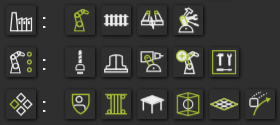 | Choisir l’icône de catégorie définit tous les composants de la catégorie. | |
The classes humans, controller and workpiece.  |
Plus d’informations sur les adaptateurs

Was this page helpful?