Génération de chemins de liaison

Génération de chemins de liaison
La génération automatique du chemin de liaison est une fonction dont l’objectif principal est de créer un chemin de mouvement entre deux opérations, exempt de toute collision entre les dispositifs de fabrication (outil, robot, etc.) et la pièce ou un autre équipement. D’autres objectifs, comme par exemple un temps de cycle minimum, peuvent être inclus dans la fonctionnalité comme exigences secondaires.
La fonction générera des chemins plus complexes qu’une connexion directe et directe entre les opérations.
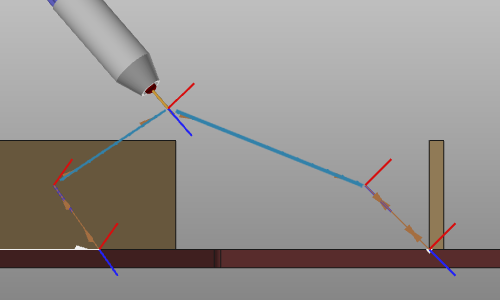
La fonction fonctionne sur des structures de trajet d’outil existantes, où elle :
-
Crée automatiquement des chemins de liaison entre les opérations si nécessaire.
-
Crée des positions supplémentaires dans le chemin de liaison d’opération lui-même.
Avec la limitation, ou condition aux limites que :
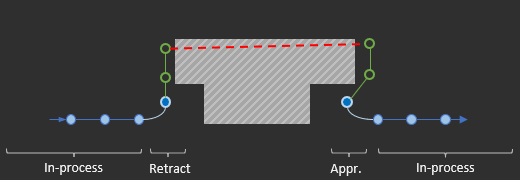
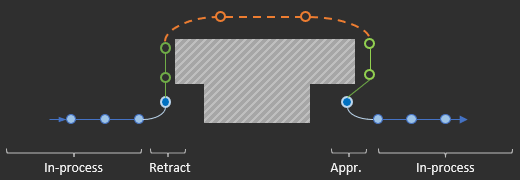
- Les positions de rétraction de la première opération et les positions d’approche de la seconde opération doivent être sans collision, car le générateur ne peut pas modifier ces positions.
L’image ci-dessous montre schématiquement la solution qui sera générée.
| Avant | Après |
|---|---|
 |  |
Conditions
Configurations système technologiques
Chaque technologie a des conditions aux limites et des exigences différentes. Les différents types de robots ou machines, leur configuration et leurs valeurs de virage (le cas applicable) ainsi que le mouvement préféré (PTP, ligne, …) sont d’une importance capitale pour calculer le chemin de liaison correct et attendu. En tenant compte de cela, il n’y aura pas de solution générale, basée uniquement sur la géométrie de la pièce. Pour chaque cas technologique et de configuration de fabrication, le système calcule sa propre solution spécifique.
Dépendance aux opérations liées
Les opérations elles-mêmes, qui seront connectées par un chemin de liaison, peuvent être modifiées ou optimisées avec les différentes fonctionnalités de programmation disponibles. Cela implique que la génération automatique du chemin de lien peut ne pas modifier ces opérations lors de la connexion. Cela signifie que :
-
Les coordonnées de position, la configuration du robot et les valeurs de virage du dernier point de processus de l’opération source et du premier point de processus de l’opération cible seront conservées.
-
Il peut donc être nécessaire de modifier la configuration et les valeurs de virage sur le chemin du lien lui-même (selon les capacités de type de mouvement).
Le type de mouvement du point cible sera modifié lorsqu’il ne correspond pas à la stratégie de liaison utilisée. Actuellement, seules les motions PTP sont utilisées pour le lien.
Axes externes
Les valeurs des axes externes seront incluses dans le calcul des chemins de liaison. Les valeurs des axes au dernier point de processus de l’opération source et au premier point de processus de l’opération cible seront maintenues. Même si ces valeurs sont modales et non explicitement spécifiées, la valeur appliquée à cet endroit est conservée.
Modifications manuelles
Les positions du parcours d’outil, générées avec cette fonctionnalité, sont modifiables manuellement.
-
Les positions modifiées restent fixes et, dans ce contexte, ne seront pas recalculées après la mise à jour avec la commande.
-
Des positions supplémentaires peuvent être insérées dans le chemin de liaison.
Coûts d’évaluation du parcours d’outil
La génération automatique du chemin de liaison peut créer des chemins de mouvement plus complexes entre les opérations de connexion qu’auparavant, afin d’atteindre l’objectif principal de fonctionner sans collision. Des mouvements plus complexes entraînent inévitablement des coûts d’évaluation du parcours d’outil plus élevés, ce qui peut à nouveau conduire à une validation incorrecte du programme. Et bien que l’évaluation du parcours d’outil soit réalisée pour les critères de collision, de reachabilité, de singularité et de limite de proximité d’axe, le chemin du lien est exclu de la détermination des coûts, afin d’éviter l’augmentation des coûts d’indexation.
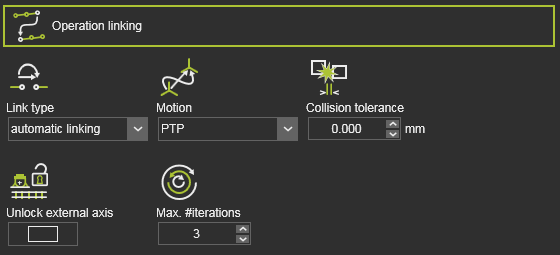
Dans l’onglet tech Operation linking du tableau de bord Active program, les paramètres du chemin du lien peuvent être définis.
Les attributs pour contrôler le calcul du chemin du lien.
| Attribut | Description | Remarque |
|---|---|---|
| Type de liaison | Le type de chemin de liaison. | Pour permettre la génération automatique, le type doit être réglé sur la liaison automatique. |
| Mouvement | Le type de mouvement le long du trajet. | |
| Tolérance aux collisions | Définit la distance de sécurité lors de la génération du chemin de liaison. | |
| (Affiché en mode Expert) | ||
| Déverrouiller l’axe externe | Utilisation de toute la plage des valeurs des axes externes pour la génération du chemin du lien. | Off : La valeur de l’axe externe ne peut être modifiée que dans l’intervalle donné par le point de début et de fin du chemin de liaison. On : Les valeurs des axes externes doivent être considérées dans toute la plage de chaque axe (c’est-à-dire déverrouillées). |
| Max. #iterations | Définit le nombre maximal d’itérations que l’algorithme de recherche de chemin va exécuter. |
Les attributs pour contrôler le mouvement le long du chemin du lien.
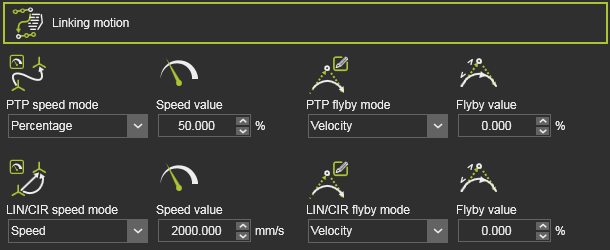
| Attribut | Description | Remarque |
|---|---|---|
| Mode vitesse | The motion speed. 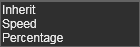 | Héritage : Aucun événement de mouvement supplémentaire n’est requis. Le mouvement hérite de sa définition et de sa valeur des paramètres globaux de mouvement PTP. Vitesse : Le mouvement est défini comme une valeur de vitesse absolue. Pourcentage : Le mouvement est défini comme un pourcentage de la valeur maximale de vitesse TCP de la ressource. |
| Valeur de vitesse | La valeur de vitesse du mouvement. | |
| Mode de survol | The flyby motion, i.e. the accuracy to move along the link path positions. 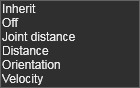 | Héritage : Aucun événement supplémentaire de précision n’est requis. La précision du survol hérite de sa définition et de sa valeur des paramètres globaux. Off : Un événement est créé pour ne pas passer par la position du chemin. |
| Valeur de survol | La valeur de la précision du survol. |
Les événements seront définis à la première position du chemin de liaison, mais seulement si l’attribut a été défini ici. Sinon, le mouvement hérite des valeurs de la définition existante (globale).
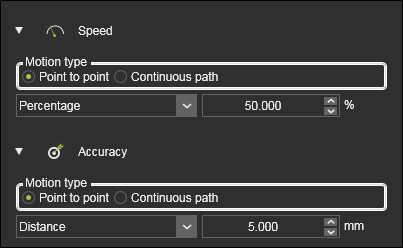

Les modifications apportées ici aux attributs nécessitent une régénération du chemin de liaison en exécutant l’ordre encore.
Génération de chemins
La génération automatique du chemin de lien utilise une méthodologie d’étapes itératives pour trouver le résultat. Lorsqu’il est exécuté, un panneau apparaît pour indiquer l’avancement du processus.
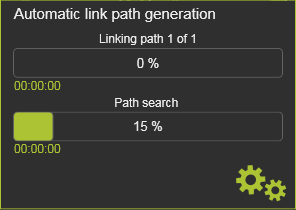
État du chemin du lien
L’état de la génération automatique est conservé et rendu visible dans le tableau de bord du Toolpath Monitor.
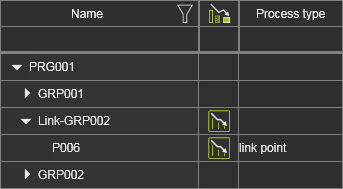
La colonne ici indique si le processus automatique de génération de chemin de liaison a été exécuté et quel est son statut.
 | Vide ; aucun chemin de liaison automatique n’a été généré. |
 | La génération automatique a été lancée et est toujours en valeur. |
 | La génération automatique a été lancée, mais est obsolète (c’est-à-dire dépassée) à cause d’autres modifications (supplémentaires). |

