Attributs conjoints
Attributs conjoints
Le conteneur Kinematics s’ouvre sur une liste contenant tous les attributs définis au sein du composant, indiqués par leurs noms. En sélectionnant l’un d’eux, ses attributs sont classés en six groupes. Un surlignage croisé dans la vue 3D et l’interface du tableau de bord apparaît.
Dans le cas où la ressource est de type production avec un squelette cinématique, le conteneur Kinematic inclut certains attributs de comportement spécifiques.
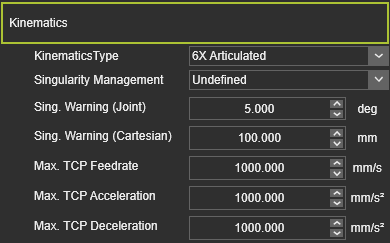
| Attribut | Description | S’applique à |
|---|---|---|
| Type cinématique | The characteristics of the kinematic behavior of the resource. 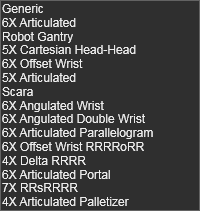 |  Robots and machines Robots and machines |
| Gestion des singularités | Le comportement de la ressource lorsqu’elle atteint sa position de singularité. | Robots and machines |
| Chantez. Articulation d’Avertissement | L’angle de l’articulation est pour afficher un avertissement lorsque la ressource atteint presque sa position de singularité. | Robots and machines |
| Chante. Avertissement cartésien | La distance pour afficher un avertissement lorsque la ressource atteint presque sa position de singularité. | Robots and machines |
| Débit maximal TCP | La vitesse de fonctionnement du TCP de la ressource ; valeur en mm/s. | Robots and machines |
| Accélération max. TCP | L’accélération maximale du TCP ; Valeur en mm/s2. | Robots and machines |
| Décélération max. TCP | La décélération maximale du TCP, valeur en mm/s2. | Robots and machines |
Une articulation cinématique possède les attributs de base suivants. À la création de l’articulation, les valeurs par défaut des attributs sont données par le logiciel, selon le type de joint choisi. Les attributs sont affichés et modifiables dans les fonctions du tableau de bord des différents établis qui soutiennent la création des joints cinématiques.
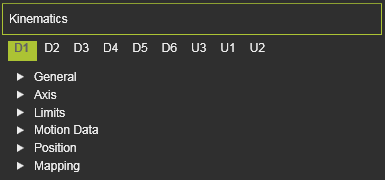
| Attribut | Description | Remarque |
|---|---|---|
 | ||
| Nom | Le nom du lieu. | Un nom vierge est autorisé. |
| Type cinématique | The type of the joint according to the classification as described above.  | |
| Type d’articulation | The class of the joint according to the classification as described above. 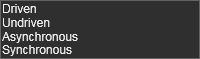 | |
| Valeur actuelle | La valeur actuelle de la capacité de mouvement, par rapport à sa position de conception. | Valeur en mm ou degré. |
 | ||
| Axe indexé | Un interrupteur pour définir si le mouvement de l’axe indique la position de l’axe, c’est-à-dire prédéfini en pas au lieu d’un mouvement libre. Une fois réglés, les attributs suivants apparaissent : | S’applique uniquement au type de joint asynchrone |
| Taille des pas | La valeur incrémentale dans laquelle l’axe se déplace vers sa position suivante. | |
| Décalage | La valeur de départ est décalée par rapport à la position initiale la plus basse. Les pas indexés sont ensuite exécutés à partir de cette position décalée. | |
 | ||
| X, Y, Z | Le vecteur de mouvement de l’articulation. | Les coordonnées sont définies selon le système global de coordonnées du composant. |
 | ||
| Minimum, Maximum | La valeur minimale et maximale du mouvement articulaire. | Valeur en mm ou degré. |
 | ||
| Vitesse | La vitesse avec laquelle l’articulation bouge. | Valeur en mm/s. |
| Accélération | L’accélération de l’articulation pour atteindre sa vitesse. | Valeur en mm/s2. |
| Décélération | La décélération de l’articulation pour s’arrêter. | Valeur en mm/s2. |
 | ||
| X, Y, Z | Les coordonnées X, Y et Z de l’articulation. | Les coordonnées sont définies selon le système global de coordonnées du composant. |
| Roulis(X), Tangage(Y), Lacet(Z) | Le roulis, l’orientation du tangage et du lacet de l’adaptateur. | Les angles d’orientation sont fixés selon le système de coordonnées global du composant. |
 | ||
| Définir la valeur actuelle | Définit la valeur que la position actuelle doit représenter. Cela peut différer de la valeur selon le design ou une autre source d’information. | Valeur en mm ou degré. |
| Décalage vers modèle mathématique | Définit la valeur que la position actuelle doit être décalée par rapport au modèle mathématique utilisé par le logiciel pour générer la position. | Valeur en mm ou degré. |
