Téléverser un programme

Avec la commande Upload program, les programmes existants peuvent être téléchargés dans le projet en cours.
Lorsque la commande est lancée, un navigateur de fichiers standard s’ouvre pour rechercher et sélectionner le programme recherché pour le téléchargement. Ensuite, le téléchargement continue et le(s) programme(s) est importé(s).
Mais si un programme existe déjà, la fenêtre de téléversement du programme apparaît.
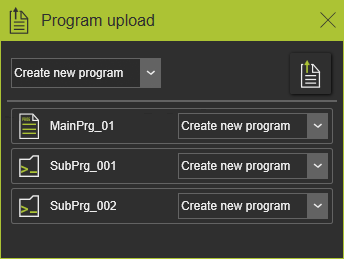
Le panneau affiche une liste de tous les programmes principaux et sous-programmes qui font partie de l’action de téléchargement et qui existent déjà dans le projet sous le même nom. Pour chacun d’eux, il faut décider comment l’importation doit être effectuée.
| Ne pas téléverser | L’élément du programme sera ignoré et donc non importé lors de l’upload. |
| Écraser le programme | Un programme existe déjà sous le même nom. Ce programme sera écrasé par la version téléchargée. |
| Créer un nouveau programme | Un programme existe déjà sous le même nom. Un nouveau programme sera généré à partir de la version téléchargée. Son nom reste le même, prolongé par un numéro séquentiel. |
Pour plus de commodité, la commande en haut à gauche du panneau permet de définir l’action d’envoi globale de tous les programmes de la liste d’un seul clic.
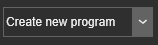
Dans le sélecteur déroulant, l’action globale requise peut être spécifiée. Mais évidemment, il est toujours possible de mettre en place des actions individuelles.
Une fois les actions de téléversement définies, le téléchargement proprement dit doit être lancé avec le bouton Execution en haut à droite du panneau.
Closing the window with the  symbol in the title bar terminates the process and thus cancels the
Upload.
symbol in the title bar terminates the process and thus cancels the
Upload.
Pour des raisons de personnalisation, il est possible d’exécuter un script Python avant que le téléchargement ne soit exécuté et après qu’il soit terminé.
Ces scripts dédiés se trouvent dans le dossier plugin <plugin>\Technologies<nom technologique>\<fabricant ou Standard>\AuxiliaryCommands\AutoExecute. Cela peut être le plugin d’installation par défaut ou tout autre dossier de plugin configuré.
Le script à exécuter avant est nommé (obligatoire) PrevProgramUpload.py.
Le script à exécuter ensuite s’appelle PostProgramUpload.py.
Pour l’exécuter dans l’établi Onsite Editor, ils sont nommés PrevProgramUploadOnsite.py et PostProgramUploadOnsite.py.
