Commandes Paste

Le Paste commands ouvre un sous-menu pour sélectionner où et comment l’élément du parcours de l’outil (tag) doit être inséré. Cela peut se faire soit avant, soit après la position d’où la commande a été exécutée, avec deux méthodes possibles.

 Retour de niveau
 Coller après
 Coller avant
 Collez l’absolu avant
 Collez l’absolu après
Il y a une légère différence entre une pâte classique et la commande de colle absolue. Cela sera expliqué par les images ci-dessous.
L’action regular paste insère l’élément du parcours de l’outil copié avant ou après la position sur laquelle la commande de collage est exécutée.
| Bien reçu | Coller avant | Coller après |
|---|---|---|
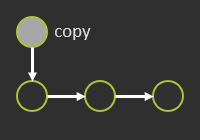 | 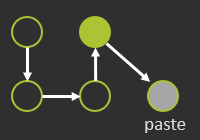 | 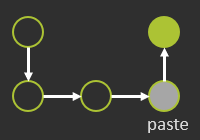 |
Les nouvelles positions insérées sont marquées dans l’espace 3D par I.
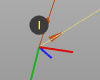
Les actions absolute paste insèrent le nouvel élément aux mêmes coordonnées que leur (leur) original, désigné par la trame de base du projet.
| Bien reçu | Collez l’absolu avant | Collez l’absolu après |
|---|---|---|
| 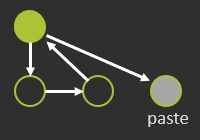 | 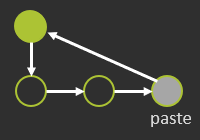 |
Les nouvelles positions absolues insérées sont marquées dans l’espace 3D par IA.