Bouge l’articulation

Avec la commande Move, la position de conception de l’articulation peut être modifiée. La commande lance un sous-menu avec trois options sur les autres objets qui doivent se déplacer avec l’articulation.
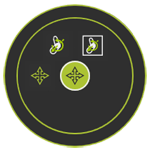
 Retour de niveau
 Repositionne l’articulation sans déplacer aucun objet attaché.
 Repositionne le joint, y compris ses corps géométriques attachés.
 Repositionne l’articulation incluant tous les objets attachés, les corps géométriques, les cadres, les adaptateurs, etc.
Lorsque la commande est lancée, le Manipulateur de Mouvement est placé à l’articulation.
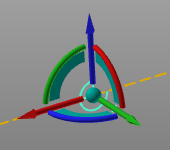
Maintenant, l’articulation, et les objets attachés lorsque la sous-commande correspondante est sélectionnée, se déplacent avec le Manipulateur. L’opération de déplacement reste active jusqu’à la fermeture du Manipulateur en appelant le menu Pie au centre de la sphère du Manipulateur et en choisissant le centre de la Pie. Utiliser la fonctionnalité interactive ou la fenêtre de coordonnées du Manipulateur permet de placer précisément l’objet à l’emplacement et à l’orientation requis.