Component libraries
FASTSUITE Edition 2 supports to use external component libraries to load predefined vendor or custom build components and layouts, like robots or master workcells, into the running session..
Folder based library
The folder based component library collects the components and layouts from predefined folders and their sub-folders. This can be on any local or netwok drive.
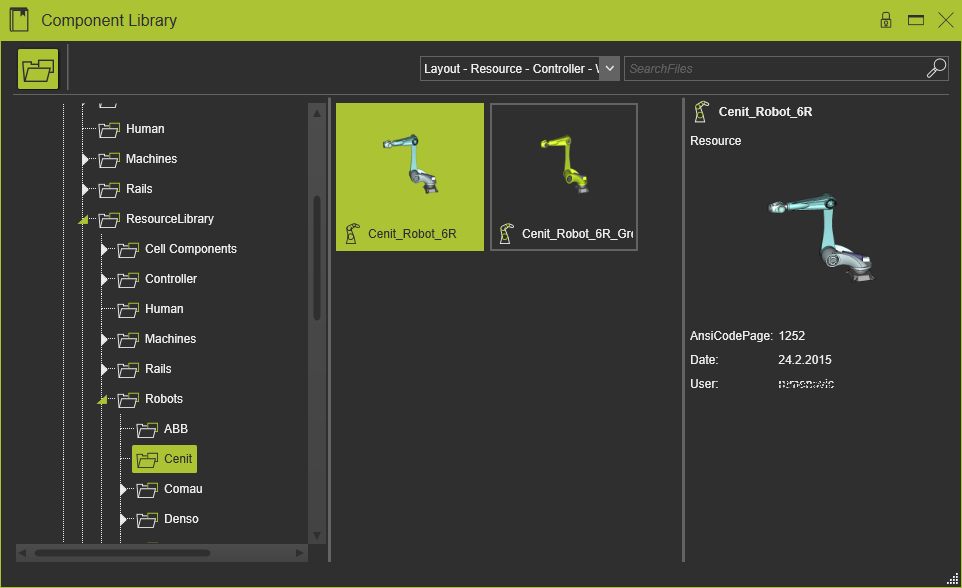
When the library is opened, the system will search through all defined folders and their sub-folders for resources, controllers, workpieces and layouts. The result of this search is shown in the Library dashboard. The tree structure of folders is automatically reduced to show only folders that actually have components or layouts inside.
The search folders are defined in the FASTSUITE Edition 2 configuration file FASTSUITE_E2.exe.config that can be found in the installation path of the software. In the section define paths for library the folders can be defined like in the example below.
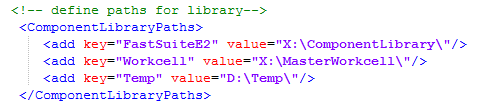
| key | The configuration name of the drive or folder. |
| value | The local or network folder to search through. |
Component library
The software comes with a package of manufacturing equipment from worldwide vendors, collected in a component library. This library can also be downloaded from:

Open the component library
