Geometry visualization

With the Geometry visualization command, the visualization mode of the 3D geometry can be set.
There are 4 different styles:
 | Shading all surfaces are rendered | 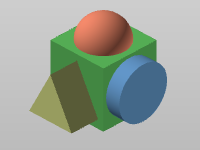 |
 | Shading with edges all surfaces are rendered, the edges are separately visualized | 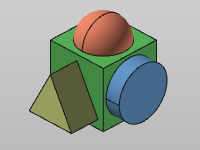 |
 | Tessellation edges only the edges of the tessellated surfaces are visualized | 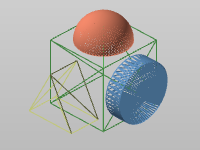 |
 | Tessellation vertices the vertices of the tessellation surfaces are visualized | 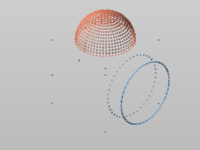 |

The FASTSUITE Edition 2 software uses routines to describe geometry through tessellated triangles. This has a positive impact on the performance of the software. And because of the typical usage of the software there is no direct need for having the geometry of robots, machines and other equipment displayed with all the small geometrical details those objects in reality have.
Depending on with which option (see the Settings) the geometry has been imported, the topology of that geometry is kept or lost. If this topology is not kept, all the geometrical edges of the object are no longer available. Therefore, in such case, the observer will not see any difference between the visualization mode Shading and Shading with edges.
For better graphical performance, the edges, when visible in the shading with edges mode, are not displayed while running a 3D View manipulation like panning, zooming or rotating.