Transformer la soudure continue en soudure à points
Objectif
Apprenez à appliquer différentes stratégies de soudure.
Chargez le projet Arcwelding_Basic.cenprj depuis le dossier Projets de cette bibliothèque tutoriel.
Étapes
1. Programmer une opération de soudure
1.1 Programmer l’opération de soudage sur la géométrie de procédé existante
Changer : Programmer le trajet d’outil et programmer l’opération de soudage sur la géométrie du procédé existante, c’est-à-dire la définition des joints.

Opération de soudure
2. Soudure au point
2.1 Changer la méthode de soudure de continue à maille
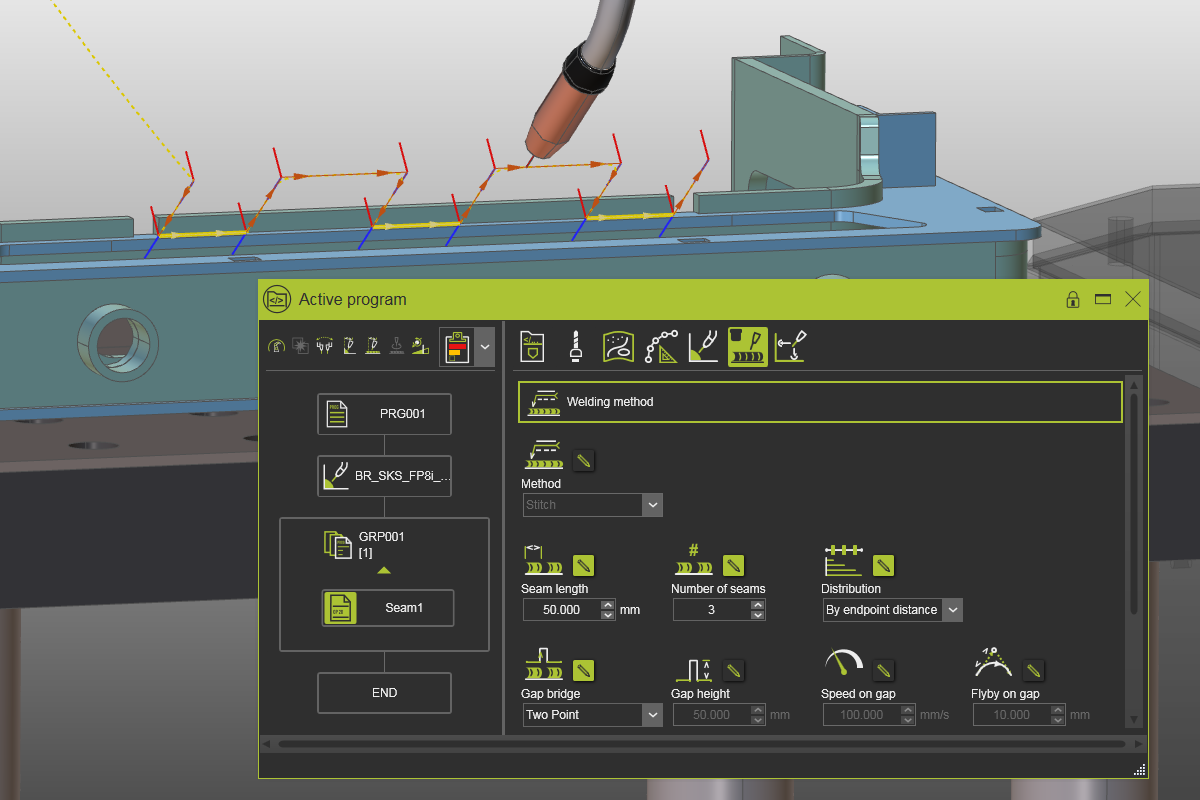
Ouvre le tableau de bord du programme Active. Sélectionnez l’onglet Soudage et ouvrez le contenant Méthode de soudage. Changez la méthode de soudure de continue à maille.

Soudure au point
![[link:Ref_Tech_StitchWelding]](/_next/static/media/help_32.a83448e5.png)
2.2 Modifier le nombre de mailles et la longueur de couture
Changez le nombre de mailles (coutures) et la longueur de couture, puis lancez une simulation pour observer les effets.
Soudure au point
2.3 Modifier les paramètres de mouvement de l’écart
Changez les paramètres qui définissent le mouvement sur l’espace entre deux coutures et lancez une simulation pour remarquer les effets.
Soudure au point