Modification de la conception globale
Objectif
Cette page explique comment modifier la conception globale des luminaires, y compris les ajustements de la plaque de base et les mises à jour des plaques de support.
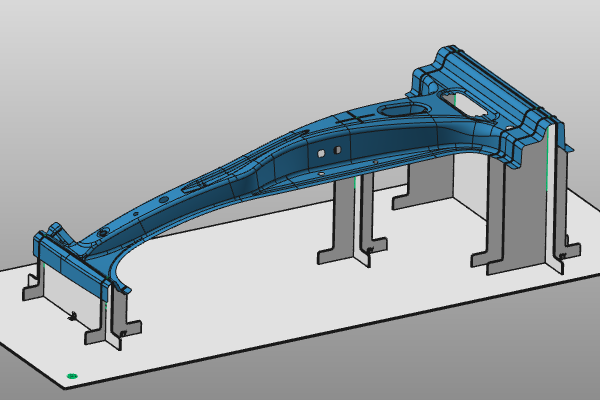
Continuez avec le luminaire de la page précédente. Si nécessaire, chargez fixture_training1_1.cendoc depuis le dossier d’installation du matériel d’entraînement.
Étapes
1. Modifier la plaque de base
1.1 Repositionnement et mise à jour de la plaque de base
Utilisez le manipulateur pour modifier la position et l’orientation de la plaque de base par rapport à la pièce. Exécutez la commande Update au centre de manipulation pour recalculer le luminaire.

Modifier la position de la plaque de base
1.2 Redimensionner la plaque de base
Ouvrez le menu de tarte sur la plaque de base et lancez Redimensionner la plaque de base. Mettez à jour les dimensions de la plaque dans le panneau, puis cliquez dans l’espace 3D vide pour appliquer la nouvelle taille.

Redimensionnez la plaque de base
2. Modifier les plaques de support
2.1 Plaque de support de déplacement X1
Sélectionnez plaque de soutien X1, ouvrez le menu en secteur, et lancez Déplacer plaque de soutien. Faites glisser la plaque à la position requise en utilisant l’axe du manipulateur.

Déplacer la plaque de support
2.2 Plaques de support de déplacement X2 et Y2
Déplacez aussi les plaques X2 et Y2 à leurs positions requises.
La commande Move reste active après avoir glissé. Appuyez sur Échap ou lancez une autre commande pour terminer.
Déplacez les plaques de support
2.3 Ajouter une plaque de support avec la longueur donnée
Déplacez le manipulateur à la position souhaitée et exécutez Ajouter une plaque de support avec la longueur donnée sur son axe. Entrez la longueur de plaque requise dans le panneau, puis cliquez dans l’espace 3D pour calculer la plaque.

Ajoutez une plaque de support avec la longueur donnée
2.4 Ajouter une plaque de support pleine longueur
Placez le manipulateur à une autre position et passez Ajoutez une plaque de support pour construire une nouvelle plaque de longueur maximale.

Ajoutez une plaque de support
2.5 Redimensionner une plaque de support
Pour réduire la longueur de la plaque de support, placez le manipulateur à la base de la plaque, du côté que vous souhaitez raccourcir. Exécutez Redimensionner la plaque de support et traîner le manipulateur à la position requise.
La commande reste active jusqu’à ce que vous appuyiez sur Échap ou que vous lanciez une autre fonction.
Plaque de support de redimensionnement
2.6 Plaque de support divisée Y1
Choisissez la plaque de support Y1 et passez la plaque de support fendue. La plaque est fendue à la position centrale du manipulateur projetée. Ensuite, relocaliser et redimensionner les deux plaques résultantes.

Plaque de support fendue
2.7 Créer des plaques dans les deux directions X et Y
Lorsque la plaque de support Add (de longueur donnée) est lancée au centre du manipulateur, une nouvelle plaque est créée dans les deux directions X et Y.
Ajoutez des plaques de support en X et Y
3. Sauvegarder
3.1 Sauvegardez vos modifications
N’oubliez pas de sauvegarder toutes les modifications apportées au luminaire.

Sauvez le match
Étape suivante
-> Autres caractéristiques de design