Améliorer la forme de support de la plaque de support
Objectif
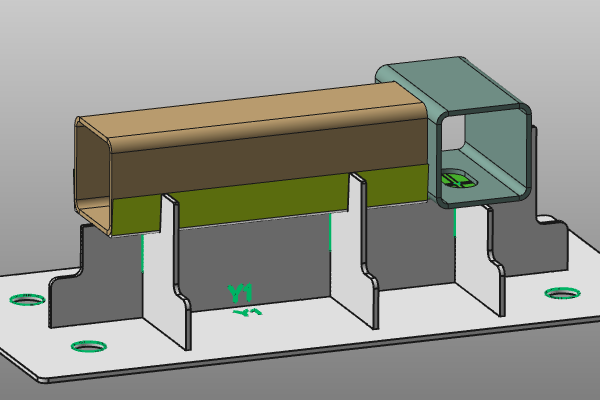
La forme de la plaque de support qui supporte la pièce est calculée directement à partir de la forme de la pièce. Dans certaines zones locales, cela peut produire une géométrie indésirable.
Cette page explique comment améliorer la forme de port en utilisant des surfaces de masquage afin d’éviter ces situations.
Chargez le projet Fixture_Training_MaskingSurface.cendoc depuis cette bibliothèque de tutoriels.
Étapes
1. Retirer le matériau superflu
1.1 Analyser la plaque de support
Passer en mode de fonctionnement géométrique. Masquez la pièce en changeant l’état d’affichage/masquage des éléments sélectionnés. Examinez les zones de plaque de support superflues. Ensuite, passez à Masquer l’espace de travail et restaurez la pièce dans l’espace de travail Afficher normal.

Analyser la plaque de support
1.2 Installations de luminaires ouverts
Lance la commande Utilitaires.

Installations de luminaires
1.3 Créer un aperçu de surface de masquage
![[link:Ref_FB_MaskingParameters]](/_next/static/media/help_32.a83448e5.png)
Sélectionnez le bord avant du tube marron où la forme de support doit être améliorée. Sur ce bord, ouvrez le menu en forme de secteur et commencez à créer une surface de masquage. Regardez la prévisualisation 3D et le panneau des paramètres.

Aperçu de la surface de masquage
1.4 Calculer la surface de masquage
Réglez la longueur de la base à 40 mm et vérifiez que l’aperçu s’étend suffisamment pour couvrir également le trou dans le tube vert. Acceptons la définition pour calculer la surface de masquage.
Les plaques de support sont mises à jour et le matériau indésirable est retiré.
Surface de masquage de calcul
2. Créer une tolérance à la pièce
2.1 Créer un soulagement de tolérance de bride
Sélectionnez le bord inférieur à l’arrondi inférieur du tube brun et exécutez Créer une surface de masquage.
Définissez ces valeurs :
- Longueur de base : 7,5 mm
- Longueur de la bride : 25 mm
- Rayon de bride : 2 mm
Calculez la surface de masquage et vérifiez la nouvelle forme de la bride de la plaque de support.
Créer un soulagement de la tolérance
2.2 Modifier la surface de masquage
Exécutez Edit sur la surface de masquage et changez l’angle de conicité de la bride à 5 degrés. Examinez l’effet géométrique.

Modifier la surface de masquage
2.3 Créer une tolérance du côté opposé
Créez le même soulagement de tolérance de l’autre côté du tube. Si l’orientation de l’aperçu est incorrecte, utilisez le bouton Swap requis dans le panneau des paramètres pour corriger la direction.
Créer une surface de masquage
2.4 Répéter pour le côté opposé de la plaque de support
Répétez les mêmes étapes pour créer des brides de tolérance équivalentes de l’autre côté des plaques de support.

Plaques de support à redimensionnement