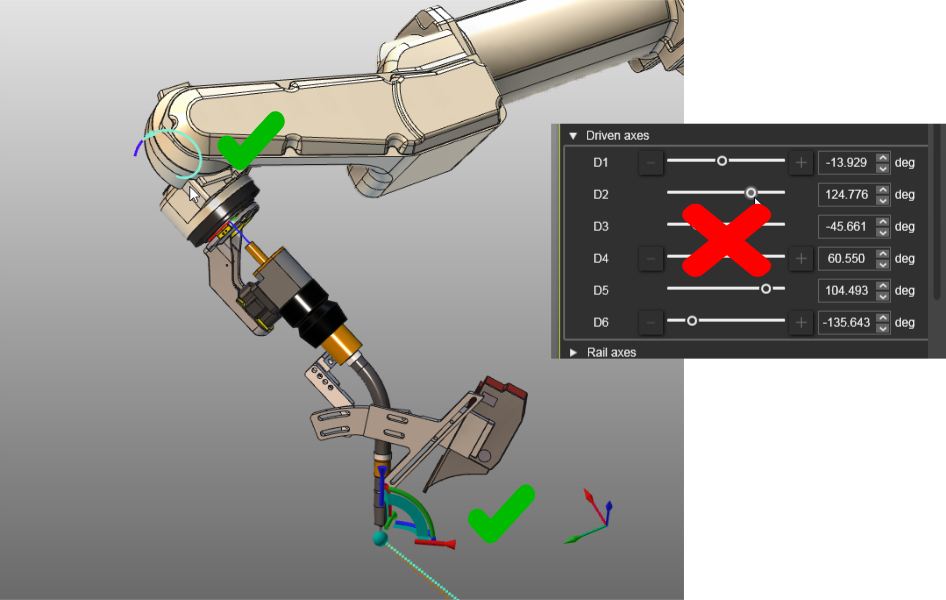
Limites des articulations dynamiques entre robot et machine

Limites des articulations dynamiques
De nombreux contrôleurs robots et machines permettent de définir des limites dynamiques des articulations, où la valeur minimale et/ou maximale d’une limite dépend de la valeur d’un autre axe. Les raisons de telles limites peuvent être des obstacles dans l’enveloppe de travail du robot ou de la machine, ou pour éviter l’enroulement indésirable des sacs de robes, câbles ou tuyaux.
FASTSUITE L’édition 2 fournit un API Python pour créer ces règles de limite obligatoires.
Comment définir les limites des articulations dynamiques
Cette page illustre la création d’un ensemble de règles pour un robot OTC-DAIHEN.
1. Acquire the limits
D’abord, nous devons acquérir les soi-disant Limites Soft de Liaison du contrôleur OTC :
-
Augmentez le niveau de protection utilisateur au moins à Spécialiste. (R->314 Entrer le mot de passe FD-ST : 12345)
-
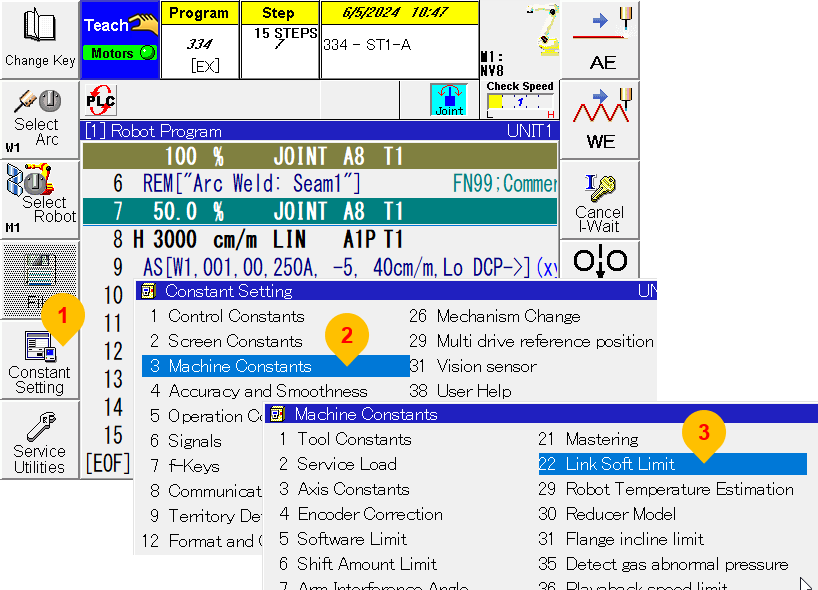
Navigate to:
- (1) Constant Settings
- (2) Machine Constants
- (3) Link Soft Limit.
-
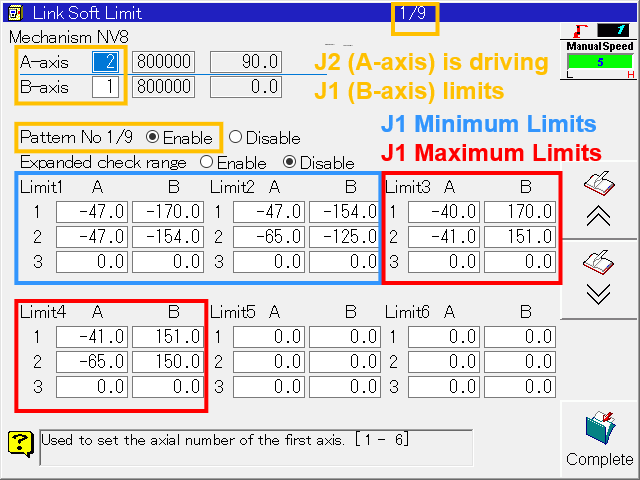
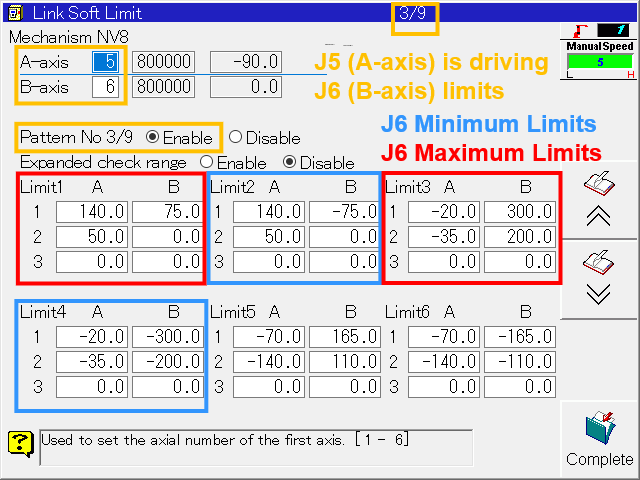
Each page represents the limits of one driving and one dependent axis. Only the pages that are enabled need to be considered.
Joint 2 moves in between -65° and +180°. Joint 1 can normally move in between -170° and +170°. Only when Joint 2 is within the specified ranges as shown below, the limits of Joint 1 are restricted.
E. g. Limit2 defines that the lower limit of Joint 1 ramps down from -125° to -154° while Joint 2 moves from -65° to -47° and so on. All applicable limit conditions need to be considered in the Python script specific to this particular robot.
-
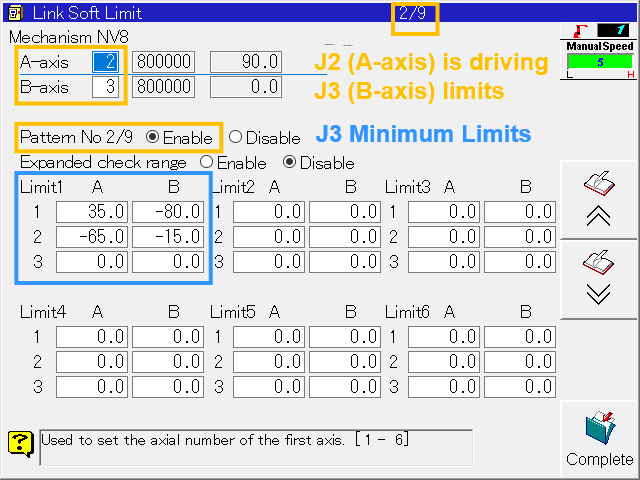
On page 2, Joint 3 is also dependent on Joint 2. Limit1 defines that the lower limit of Joint 3 ramps down from -15° to -80° while Joint 2 moves from -65° to 35°. The maximum limit of Joint 3 remains unchanged.
2. Créer le script Python
-
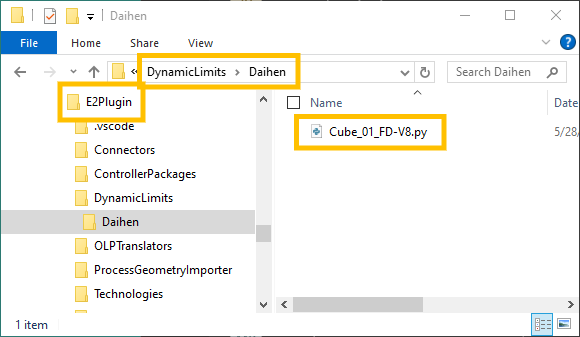
Next we need to create a Python file and store it in the E2Plugin folder you use for your customization.
-
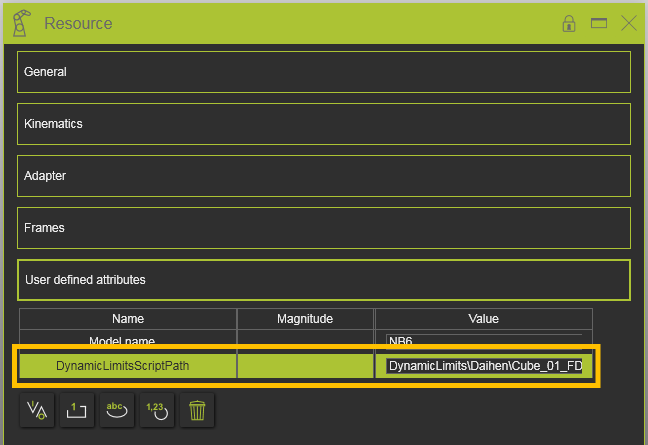
Open the robot resource in your Edition 2 session. Open its properties dashboard and add a string attribute by the name of DynamicLimitsScriptPath in the User defined attributes container.
The Python file name and its path can be provided relative to the E2Plugins folder or as an absolute path including drive letter.
-
The following Python code demonstrates how multi-range limits for multiple joints can be composed. Add these lines to the Python file of step 2.1.
# Import libraries
from centypes import *
from cenpylib import DynamicLimits as DL

def CheckJointsDynamicLimits(joints):
    j1 = joints[0]
    j2 = joints[1]
    j3 = joints[2]
    j5 = joints[4]
    j6 = joints[5]

    # Check J1 dependent on J2
    j1min = InRange(j2, -65, -47)*DL.Ramp(j2, -65, -125, -47, -154) + InRange(j2, -47, 180)*-170
    j1max = InRange(j2, -65, -41)*DL.Ramp(j2, -65, 130, -41, 151) + InRange(j2, -41, 180)*170
    if not (j1 >= j1min and j1 <= j1max):
        return UNREACHABLE

    # Check J3 dependent on J2
    j3min = InRange(j2, -65, 35)*DL.Ramp(j2, -65, -80, -35, -15) + InRange(j2, -35, 180)*-80
    j3max = InRange(j2, -65, 180)*100
    if not (j3 >= j3min and j3 <= j3max):
        return UNREACHABLE

    # Check J6 dependent on J5
    j6min = InRange(j5, -140, -70)*DL.Ramp(j5, -140, -110, -70, -165) + InRange(j5, -70, -35)*DL.Ramp(j5, -70, -165, -35, -200) + InRange(j5, -35, -20)*DL.Ramp(j5, -35, -200, -20, -300)
    j6max = InRange(j5, -140, -70)*DL.Ramp(j5, -140, 110, -70, 165) + InRange(j5, -70, -35)*DL.Ramp(j5, -70, 165, -35, 200) + InRange(j5, -35, -20)*DL.Ramp(j5, -35, 200, -20, 300)
    if not (j6 >= j6min and j6 <= j6max):
        return UNREACHABLE

    return REACHABLE

def InRange(joint, x1, x2):
    """Dynamic limits utility functions.

    Returns:
        integer: 0 or 1.
    """
    if joint < x1 or joint > x2:
        return 0
    else:
        return 1
More information about Python customization can be found in the documentation Technology customization with Python API.
-
There are two limitations with respect to dynamic joint limits:
a. The joint limits that are shown in the Simulation monitor are not updated when a dynamic limit kicks in.
b. The Dynamic Limits function is not called when an axis is modified in the Teach panel. Instead, use the manipulator or grab the robot joint directly in 3D to invoke the inverse kinematics.