Nesting_ExportDXF
 | Export the nesting sheet to DXF for offline programming in some external application.  |
| Export the nesting sheet | ||
|---|---|---|
| 1 | Start the Save nesting command by picking the icon with the left mouse button. |   |
| 2 | A windows file browser appears. | |
| 3 | Browse to the disk and folder where the nesting (workpiece) needs to be stored. | |
| 4 | In the option Save as type set the document type to 2D DXF. | 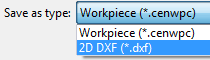 |
| 5 | Accept the name of the nesting, default system name or already modified in the workpiece dashboard, or change it here when necessary. |  |
| 6 | Confirm saving the nesting by clicking on the Save button. |  |
Was this page helpful?